Today we look at how to digitally make a 7 Circuit Circular Labyrinth. This method is a draw and cut method, meaning you will be making edits that remove lines you have previously drawn as you move thru the steps. It is possible to use a drawing only method but I think it is much more complicated with many more steps. Let’s get started. I should also mention that this is an improved method which creates a 4 section labyrinth (you can make many different versions of a circular labyrinth by cutting it into slices - examples below).
Step 1: Draw 8 Concentric Circles
Draw 8 concentric circles each an equal distance between one another and centered around the middle circle. The middle circle will become the labyrinths goal.

Step 2: Draw the 4 Inner Walls
I could break this into more steps but there are 4 straight lines that form inner walls and pathways at the turn around points. See the example. At 12 o’clock create 1 line from the center goal blocking paths but the outer one. At 3 o’clock add a line to block all but the inner pathway next to the goal. Use 2 lines to draw a pathway from the center to the bottom edge (notice neither are at 6 o’clock, but they are centered). The left line is drawn across all circles. The right line goes across all pathways but the final one. Add a line at 9 o’clock blocking all pathways except the one next to the goal.
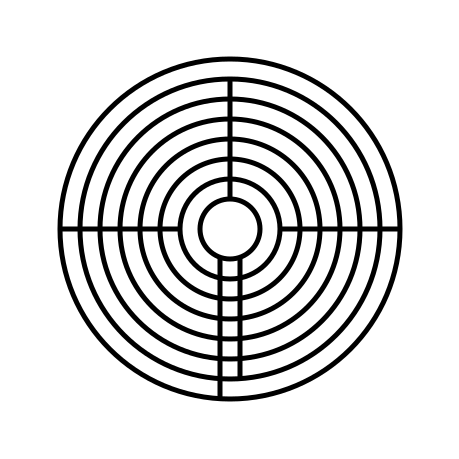
Step 3: Add Pathways Where Needed
Refer to the picture and add pathways where needed, erasing portions of the circles. There are many, and depending on how you draw/erase them the number can change. They are all at 3, 6, 9 and 12 o’ clock.

That completes the drawing of a 7 Circuit Circular Labyrinth.

7 Circuit Circular Labyrinth
My original version of the 7 circuit circular labyrinth is below. I made it using a shortcut, which you also could use if you prefer this look better (obviously I do not, because I re-did this entire post for the new version !). Draw a 5 Circuit Circular Labyrinth, add two more concentric circles, extend the left center line to the bottom edge and create the exit. It’s easy to write in a sentence, but much more difficult to do ! Good Luck !

Alternative versions - number of labyrinth sections
Here is a look at what the labyrinth could you like if you want to make it with different sections. I am re-using the illustration I made for the 5 circuit circular labyrinth. It shows the 1, 2, 3, 12, 8, and 6 section versions which could also be created. I tend to always gravitate towards 4 sections, then 2. 1 seems a bit boring and 12 seems like too many to me. For a full look at this subject I did a blog post using the 9 circuit circular labyrinth.
If you like the mathematics of this did you notice that the 3 section is the only one where the initial entrance into the labyrinth goes to the center first before the back and forth begins. What other sectionals would require this ? A 5 section ?
Also, you when creating circular labyrinths you can mix sections by level as I showed above… the outside is one section while other levels are 2 and 4. You have flexibility in the design. In the end symmetrical versions tend to look the most pleasing.

REAL WORLD LABYRINTH EXAMPLES
You can find circular labyrinths to walk in the real world. Here are a few examples:
The St. Andrew’s Episcopal Church Labyrinth in Montevallo, AL is an outstanding example of a 7 circuit circular labyrinth. It is made with brick and gravel.
The View Ridge Elementary School Labyrinth in Seattle, WA is another great otter mascot logo in the center of the labyrinth.
I also found this video if you want to attempt creating your own: How do I make this labyrinth in the physical world ?
Step by step instructions on how to make other digital labyrinths. Including:
How to draw a 5 Circuit Circular Labyrinth