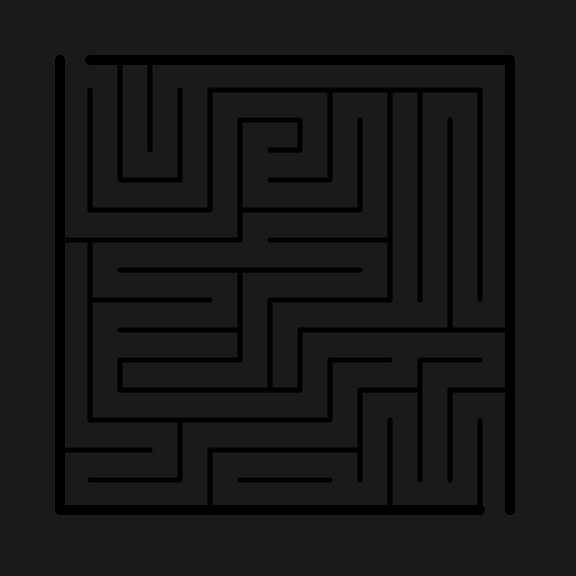
Creating a complicated Weaving Maze - an updated method

I have previously written about how to make a weaving maze, then I updated the how to with an improved method that included the addition of a guideline. Today I want to share a specific weaving maze update that focuses on the actual pathway design. I believe this method leads to better maze pathway design and gives the maze maker more control on the difficultly level of the maze. Here are the original posts along with a Pipes Maze how-to which is a themed variation of a weaving maze.

How to Make a Weaving Path Maze

How to Make a Weaving Path Maze - Improved Method

How to Make a Pipes Maze

The example I am using comes from my work on an upcoming book and will most likely become my first book of Pipe Mazes, a follow-up to my Weaving Maze book available on Amazon. Each step will have an illustration. If you prefer, at the end of the post is a gallery where you can see all illustrations back to back and watch the maze be made !

Step 1 - Create a Grid in the Shape You Want to Use

No changes here to the method. I chose a backwards c type shape.

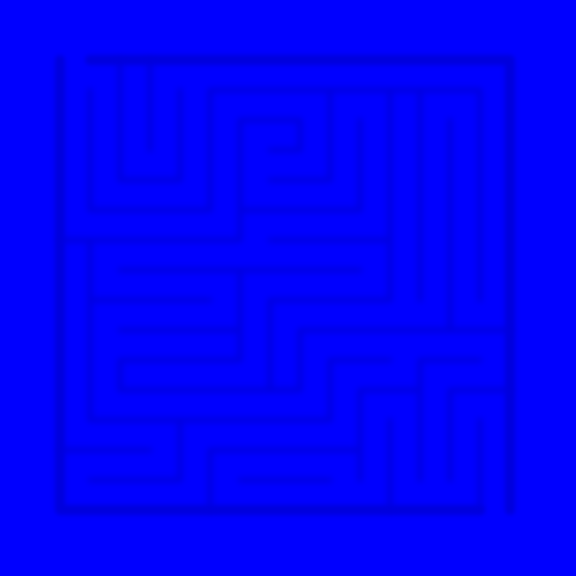
Pipe Maze Grid

Step 2 - Begin drawing The Maze

My start breaks into 4 different pathways. Pretty normal. As with any maze, the more pathways that are possible the more difficult the maze will be.

Pipe Maze Step 2

Step 3 - Break off each pathway into multiple sections

In my example I made it simple by breaking 4 pathways into 8 pathways branching each into 2 directions.

Pipe Maze Step 3

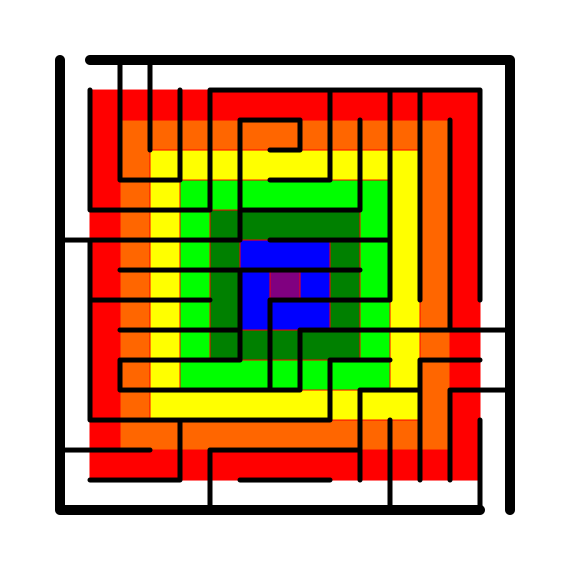
Step 4 - Color Code the Pathways

Here is the real new part of the method. Color code the paired branches so you can keep track of the solution/false pathways more easily. In my example I use 4 colors for the initial pathways as shown below.

Pipe Maze Step 4

The Theory - My weaving mazes do not have dead ends, rather loops that you need to backtrack out of. So, continue to design the maze as you normally would with one exception, when you end a pathway branch, it only ends by connecting with a like color branch. So, if a solver enters the green pathway, they are stuck in that pathway, looping around until they escape to another loop color. Of course one of the loops will contain the correct pathway. For this example 3 of the 4 colors get you stuck. The last color contains the correct pathway (but also some internal loops). Complicate the maze by creating more loops (possible pathways).

Let’s see this play out in this example. The following steps are what I took, but do not need to be followed strictly in any way, they merely break down the thought process I used when designing.

Step 5 - Complete the Blue Pathway

I made the blue pathway a long single loop. A solver will quickly realize that this is a bad direction and move to another option. I consider this an easy version of a bad pathway.

Pipe Maze Step 5

Step 6 - Complete the Aqua Pathway

Again, I decided to design a second bad pathway, but this branch includes some additional loops, so it will take the solver longer to determine they made a bad decision. However, I did this so there were only 4 pathways to take, so medium difficulty.

Pipe Maze Step 6

Step 7 - Complete the Yellow Pathway

So here I did the 3rd bad pathway, but made it very complicated. This is the pathway you do not want to take. It breaks into multiple pathways many times, all of which loop around on themselves. This is the difficult pathway.

Pipe Maze Step 7

Theory Break - From a design perspective I made each of the above pathways (each different color) a different difficulty level. Want to create an easier maze ? Use more Step 5 type blue pathways. Prefer a harder maze? Lots of Step 7 version pathways.

Step 8 - Refine your final color pathway

I now know the green pathways will contain the answer. I actually am not sure which one it will be until I get farther towards the end. So I break the green into 2 shades of green. Eventually one of these will lopp onto itself, while the other contains the solution.

Pipe Maze Step 8

Step 9 - Create the Goal

I used the color orange to designate the goal. I have done this so I can create some wrong pathways for solvers who try to solve the maze by starting at the goal. By creating the goal now, I also can plan the maze pathways better.

Pipe Maze Step 9

Step 10 - Create Goal Loops

For those back solvers. Not necessary, but the more you make the more complicated the maze will become (for back solvers). You are taking up space that could be used in the other direction however.

Pipe Maze Step 10

Step 11 - Continue creating the pathways

Pipe Maze Step 11

Step 12 - Finish the Maze

Eventually as the maze guide filled in I chose a dark green pathway to link to the orange path.

Pipe Maze Step 12

Step 13 - Recolor the pathways

Maze doesn’t look so easy now, does it ?

Pipe Maze Step 13

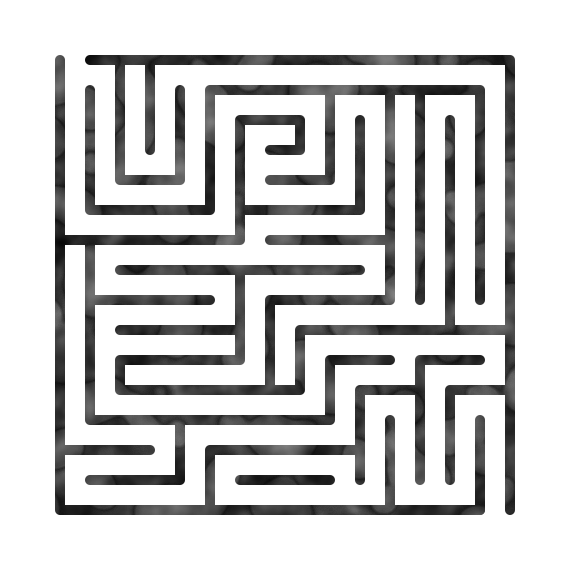
Step 14 - Make the Final Touches

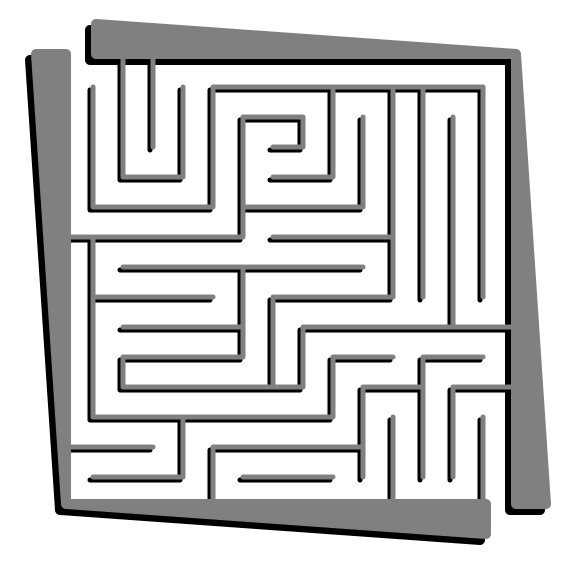
Since I made this a Pipe Maze I add the details of the start and goal and also delete the guideline to create the final maze ! This is a good time to test the maze if you want also.

Create a pipe maze Step 14

Summary:

Use colored pathways for your weaving pathways to control the difficulty of your mazes. Create false pathways emanating from the goal to further complicate your maze.

Full Build Gallery: click to watch the maze build

A Collection of Maze Design Case Studies to improve your Mazes
This post is meant to pull together all of my case studies on making mazes for easy reference. As I add new case studies, this post will be updated. There are over 30 posts to read, but I have organized them into larger sections to help get you to the content you are interested in easier.


In my very large section on How to Make a Maze I include a post on maze art which includes a case study at the end to illustrate the post:

How to Create Maze Art in 6 Easy Steps + Case Study


The first set of 6 case studies show a maze that I did not like, then I worked on them to improve them for the site:

Case Study#1 - How to Improve a Bad Maze - Tiki Totem Maze

Case Study#2 - How to Improve a Bad Maze - Danzante Conchero Chichimeca Maze

Case Study#3 - How to Improve a Bad Maze - Red Rocks Amphitheatre Maze

Case Study#4 - How to Improve a Bad Maze - The Hollywood Sign

Case Study #5 - How to Improve a Bad Maze - Severance Hall

Case Study#7 - How to Improve a Bad Maze - Ship

The next set of 6 case studies show a maze that I considered to be good, but I still took steps to improve them. They were all inspired by a blog post about improving existing maze art, Maze Art: Advanced Tips to Creating Your Own Masterpiece.

Maze Art Case Study - Bodiam Castle Maze Coloration & Improvement

  • I wanted to give you an example of what this looks like in practice. The before on the left side and the after on the right side:

Half and Half maze example

Case Study#6 - How to Improve a Maze - Uxmal

Case Study#8 - Improving Previous Mazes

Case Study#9 - Improving a Maze - Taj Mahal

Case Study#10 - Improving a Maze - Templo de Sangre de Cristo

Maze of the week #65B - Bridge Guardian Maze Updatd and Improved

In 2025 I decided to go back and improve many of my earlier mazes of the week. Here is the long list of mazes I touched:

Maze of the Week 10 Redux - The Alamo Mission (MOTW #158)

Maze of the Week 42 Redux - Sydney Opera House - (MOTW #159)

Maze of the Week 3 Redux - Museum of the North (MOTW#160)

Maze of the Week 45 Redux - Air Force Cadet Chapel (MOTW#161)

Maze of the Week 38 Redux - Hoover Dam (MOTW #162)

Maze of the Week 27 Redux - Lincoln Memorial (MOTW #163)

Maze of the Week 8 Redux - Abraham Lincoln Maze (MOTW#164)

Maze of the Week 99 Redux - Berlin Planetarium (MOTW#165)

Maze of the Week 94 Redux - BMW Welt (MOTW# 166)

Maze of the Week 39 Redux - Spaceship Earth at Epcot Center (MOTW#167)

Maze of the Week 13 Redux - Clayton Theatre (MOTW #168)

MOTW# 25 Redux - National Center for Human and Civil Rights (MOTW#169)

Maze of the Week 23 Redux - Wrigley Field Sign (MOTW#170)

Maze of the Week 59 Redux - QRO Walking Street (MOTW #171)

Maze of the Week 49 Redux - Chich'en Itza (MOTW #172)

Maze of the Week 64 Redux - Leeds Castle (MOTW#173)

Maze Redux - Darth Vader (MOTW#174)

Maze of the Week 77 Redux - Giraffe (MOTW #175)

Maze of the Week 79 Redux - Severance Hall (MOTW#176)

Maze of the Week 46 Redux - The Free Stamp (MOTW#177)

Maze of the Week 75 Redux - Peter B Lewis Building (MOTW#178)

Maze of the Week 92 Redux - Kresge Auditorium (MOTW #179)

Maze of the Week 91 Redux - Monte Alban (MOTW#180)

Maze of the Week Re-Dux #56 - Matrimandir at Auroville Maze (MOTW#181)

Maze of the Week Re-Dux #36 - Key West Buoy (MOTW#182)

And finally we have case studies on specific maze design topics that I pulled together:

Case Study#11 - Making Mazes with Shadows

Using Color for Maze Pathways - A Case Study

Maze Solving Case Study - Using the Reverse Fill Solving Method

Case Study - Making Maze Art in 3 Different Difficulties

Case Studies on Specific Maze Types:

Creating a Hidden Maze - Case Study #1

Maze Design Case Study - Designing a Grid Maze in Different Difficulty Levels

Arrow Mazes got a 14 Part series that is either for you or not. If you have never tried an Arrow Maze, I suggest you do !:

Arrow Maze Construction and Design:

Arrow Maze Components:

Extreme Arrow Maze examples:

I also did a 3 part series to help you invent your own maze types. While these are not case studies I believe the content fits here well:

Part 1 - Options for Starting and Ending a Maze

Part 2 - Maze Pathway options

Part 3 - Conditional Pathway options

Case Study#4 - How to Improve a Bad Maze - Hollywood

I have written 2 blog posts featuring a total of 20 mazes that I abandoned for one reason or another. You can read them here:

Why I abandoned these 10 mazes - Mistakes in Maze making

10 More Abandoned Mazes - Mistakes in Maze Making

I took the time to evaluate the mazes and see why they did not work and try to determine - could they be salvaged ? Today I present my 4th case study for improving one of those mazes, The Hollywood Sign. If you want to read the previous 3 case studies:

Case Study#1 - How to Improve a Bad Maze - Tiki Totem Maze

Case Study#2 - How to Improve a Bad Maze - Danzante Conchero Chichimeca Maze

Case Study#3 - How to Improve a Bad Maze - Red Rocks Amphitheatre Maze

Back to this maze. Here is what I wrote about the maze in the previous post on why it was abandoned:

“Abandoned Maze #1 - The Hollywood Sign Maze

Technically could be considered a finished maze. But it is very boring. Not particularly good. It does not bring a Kondo level of joy. The maze is easy. Could it be salvaged ? Yes, probably with some color and lots of background detail - but once you see a photo of the actual sign and it’s surroundings you notice a lot of rocks/dirt and just a few bushes. The top of the hill has fences, and cellphone towers, etc. So, this COULD be salvaged, but most likely won’t be. Mistake made: Poor subject matter / poor execution

And let’s look at that maze, also known as the ‘before’. SOOOO boring.

Hollywood Sign drawing

This was a tough one. I rated the above maze a 2 out of 10. Here are the changes I made to (hopefully) improve the maze:

1. Color added - The Hollywood letters in white should pop against the background of the hill. So I colored the hill to enable the bright white letters to pop. I did 2 versions of the hill, bright green and a more normal brownish green we need rain color.

2. Tower added - I added a tower to the top of the hill. One of many possible but enough to show what is there. I did not add the fence since most people never notice it.

3. Bushes added - The slope of the hill has many different types of bushes in various shades of green/brown and grey. I added them around the hillside. I also added some outlines of ridges and some dirt trails.

4. Blur - Although when I saved the file as a png it does not save (so I use screenshots instead), I made everything on the hill that is not a letter blurry. The hillside in pictures does not have a lot of definition or detail that is important - it is just there so highlight the sign, so the blurring helps this (I hope).

5. Letter and branding added - Added the name of the maze and added my branding.

6. Sizing Change - Slight change based on how everything looked, I kept the wide shot but gave it a bit more height based on the tower/branding locations. Initial maze was 990 x 360 and is now 990 x 494, so 37% taller.

FINAL THOUGHTS

Better. Maybe this went from a 2 to a 5. A 2 never sees the light of day. A 5 only does if I see a special case for it (like this case study).

And now the “After”. The new maze in 2 colors:

Hollywood Sign Maze
Hollywood Sign Maze alternative color

I think this is an improvement. What do you think ? Do you prefer one green over the other ?

Case Study #1 - How to Improve a Bad Maze

I have written 2 blog posts featuring a total of 20 mazes that I abandoned for one reason or another. You can read them here:

Why I abandoned these 10 mazes - Mistakes in Maze making

10 More Abandoned Mazes - Mistakes in Maze Making

I took the time to evaluate the mazes and see why they did not work and try to determine - could they be salvaged ? Today I present a case study for improving one of those mazes, the Tiki Totem Maze which ended up becoming Maze of the Week #86. Here is my analysis from the previous blog:

“Abandoned Maze #4 - Tiki Totem Maze

I thought this would be a good idea. Tiki totems are so cool. I can’t quite put my finger on this. It just isn’t good enough to be on the site as a weekly featured maze. I think it MIGHT be able to be fixed. Add color to the totem, and to make it more interesting - SHADOWS. I would also try a more complex maze structure vs the current kids level format. But I can’t be sure that will be enough…so it will not get done ….or it will. We’ll see. Mistake made: Not enough details / interest”

And I must say, for a maze to be recoverable, the mistake made of not enough details/interest is a giveaway that the maze is salvageable with some additional work. Now let’s look at that original maze, also known as the ‘before’:

Hawaii Tiki Totem simple Maze

And here are the changes I made to (hopefully) improve the maze:

1. Color - The actual tiki is not black and white (nor does it have brown accents as the initial maze pathways imply. I went with the weathered grey color of the tiki. I switched the color of the walls to a complementary charcoal color.

2. Shadows added - It is a tiki on a beach so it is in the sun. I went with lots of shadows ! This really shows the shape of the tiki better, especially the eye area. I took the extra time to shadow the nose, neck, and under the pecs.

3. Maze placement - The tiki is full length and sits in the sand on a beach, but I only made the top portion. It is also surrounded by a sea of white nothingness. After considering adding the full totem, I instead decided to place the totem against the bottom of the page which allowed for….

4. Beach scene added - By moving the totem forward there is a large background to fill. That was a perfect place to add a background that included a beach, a palm tree and the sky. I spent 70% of the time improving this maze working on the leaves of the tree, then used a gradient color to accurately color the trunk. I did my best to add foam to the break of the water at the shore.

5. Start and Goal changed - The placement also meant a change from arrows to an internal Start and Goal using lettering.

6. Sky addition - The white sky felt like empty space. Might as well finish the color. I went cloudless like a great day at the beach (with sunscreen).

7. Lettering and branding - Add the name of the maze and my branding both of which were previously missing.

Also considered but not updated:

I decided to not change the actual maze beyond minor moves. It remains easy for kids but looks a lot better for everyone; Something on the water like a boat or a shark fin, or the sky like the sun or some birds; The full totem poll (as mentioned above).

And now the “After”. The new maze:

Hawaii Tiki Totem Maze

I think this is an improvement. What do you think ? Should I have added more details ?

This is how the Tiki Totem became Maze of the Week #86 after sitting on the shelf for over 2 years ! Maze download is available !