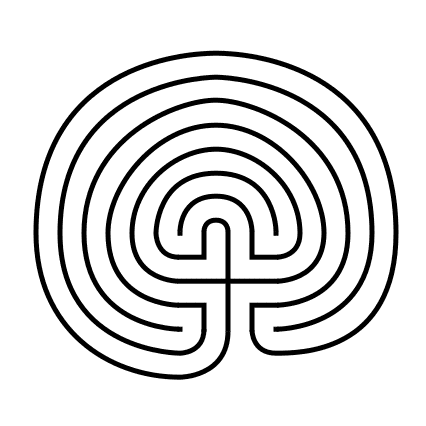
How to Draw a 9 Circuit Square Labyrinth

I’ve shown you how to draw square labyrinths using the same seed pattern as the classical labyrinth. Today I will take you through the steps to draw a 9 Circuit Square Labyrinth that has a large square center. In practice this could become a place for meditation or ceremony if built in the real world. Follow this 7 step process and make your own ! You also have the option to make this without the large center square. To see how to do that you can read - How to Draw an 11 Circuit Square Labyrinth and adjust the # of circuits.

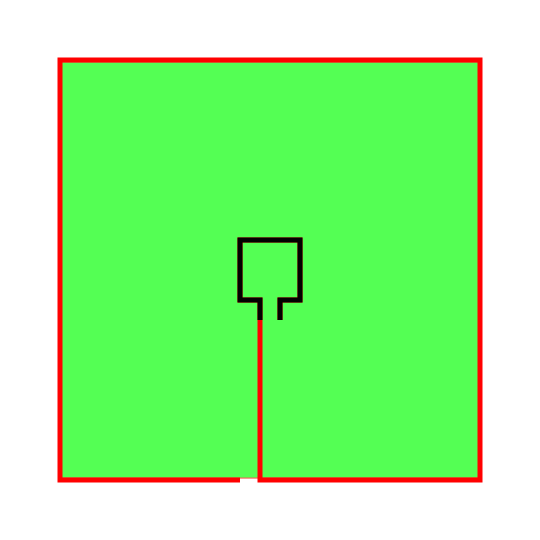
Step 1: Draw the center goal

Draw a box in the center of your paper with a one unit opening at the bottom. To help guide your future lines make a box to represent the outline of the labyrinth size you would like to make. Mine is green, but note that this will be deleted at the end, so color does not matter.

Note: IF you are using a grid, and I suggest you do, the walls of the green square should allow for 9 lines between the edge and the center goal. The total size of the grid network is 21 x 21 when you include the center goal.

how to draw an 11 circuit labyrinth part 1

Pro Tip: The math on the grid size being 21 x 21 is 9 circuits on one side + 3 grids for the goal + 9 circuits on the other side = 21 grids needed. If you are making a 15 circuit square square labyrinth you can use the same method shown here the guide grid would need to be 15 + 3 + 15 = a 33 x 33 grid. Follow all the steps below and you will create the same style labyrinth but larger !

Step 2: Draw the Outer Wall

Draw a the outer wall using the left path from the center, drawing to all way down to the edge and then moving around counterclockwise. Stop when you get one unit away from the edge line as you move around the entire box.
How to Draw an 11 Circuit Labyrinth, step 2

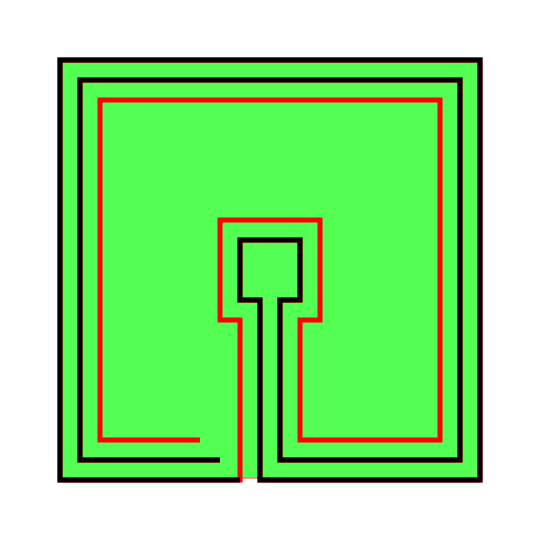
Step 3: Make the next internal line

Repeat the same step as above using the right side of the goal, leaving one unit of distance between this and the previous line to create a pathway. End the line one unit short of the previous line just above it.

How to Draw an 11 Circuit Labyrinth - Part 3

Step 4: Make the next internal line

From here on out the process will repeat. Go back to the previous line you made and make a counterclockwise wall around the labyrinth, keeping one unit from the previous line. Notice this includes moving around the center goal.
How to Draw an 11 Circuit Labyrinth - Part 4

Step 5: Make the next internal line

Same as above with the next line.

How to Draw an 11 Circuit Labyrinth - Part 5

Step 6: Make the next internal line

Same as above with the next line.

Making a 9 Circuit Square Labyrinth step 6

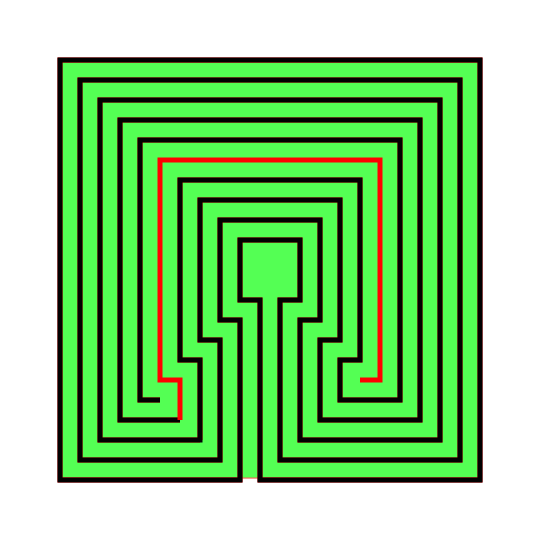
Step 7: Make the next internal line

Same as above with the next line. If everything has been done correctly this is the final line.
Making a 9 Circuit Square Labyrinth step 7

Step 8: Clean it up

Delete the background guide and enjoy your new square labyrinth !

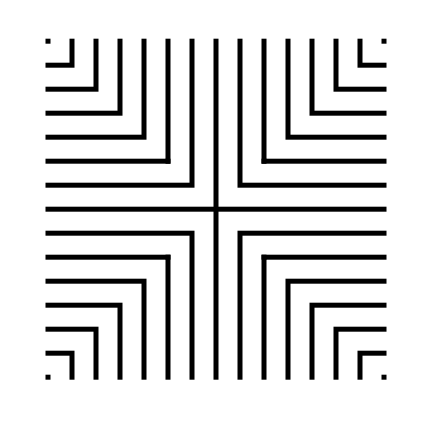
9 Circuit Square Labyrinth

That completes the drawing of a 9 Circuit Square Labyrinth.

9 Circuit Square Labyrinth

9 Circuit Square Labyrinth

Interested in learning how to make or draw other types of digital mazes ? I have step by step instructions on how to make over 40 different maze types.

If you prefer making labyrinths, you can find step by step labyrinth making instructions.
How to Draw a Massive 27 Circuit Labyrinth

Drawing a massive 27 circuit classical labyrinth feels like running a marathon. I have never run a marathon. That might be a lie. To Draw it step by step it takes a 29 step process. Writing that out and going step by step is laborious, so instead I am going to give you the cheat codes. It saves me time. If you decide to create this it probably won’t save you any. The truth hurts. Let’s get on with it.

Step 1: Draw the starting seed pattern

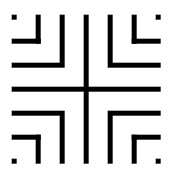
The starting seed pattern based on an imaginary 14 x 14 box grid. Start with a centered is a plus sign. Add L shapes one grid away from the plus sign in all 4 quadrants. Repeat until you have 6 L per quadrant. Finally add a dot to each of the four corners. Basically, copy the seed the pattern you see here:

27 circuit labyrinth seed pattern -how to draw an 11 circuit labyrinth part 1

Step 2: Connect the first arch to create the goal

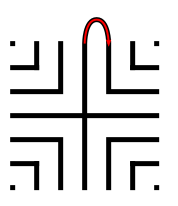
Draw a curved line from the top of the plus sign to the L directly to the right using an arch that extends 1 grid high. The top of the arch should peak halfway between those two points. This line will form what will become the goal of the labyrinth.

how to draw a 27 circuit labyrinth step 2

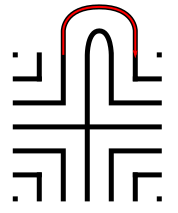
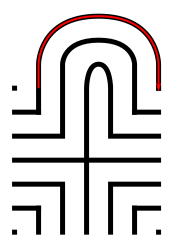
Steps 3 - 29: Connect the next endpoint to the left to the next endpoint on the right

Every step from now on will be basically the same. Move one point to your left (moving counterclockwise) and connect that to the next point on the right (moving clockwise).On the right find the listing of connection points. We already connected points 1 to 1. TIP: the top of all the arches will all align above the same point.

How to Draw an 27 Circuit Labyrinth - endpoint explanation

If you get into any trouble refer to the directions for the Classical 7 Circuit Labyrinth. This is essentially the same, but many more steps. That completes the drawing of an 27 circuit labyrinth.

27 circuit classical labyrinth

Interested in learning how to make or draw other types of digital mazes ? I have step by step instructions on how to make over 40 different maze types.

If you prefer making labyrinths, you can find step by step labyrinth making instructions.

5 Books About the Spiritual Aspect of Labyrinths

When you draw and make mazes and labyrinths daily you inevitably read about the history of each. I took some time to read about the spiritual aspect of Labyrinths and here are the 5 best books I read on the subject. I suggest starting with Walking a Sacred Path, the most well known book on the subject and the first book that I review below.

Walking a Sacred Path: Rediscovering the Labyrinth as a Spiritual Tool by Dr. Lauren Artress 201 pages. AMZN

Walking a Sacred Path Rediscovering the Labyrinth as a Spiritual Tool by Dr. Lauren Artress.png

What I learned in this book:

  • Walking a labyrinth is a very personal experience for anyone who does it. Often it is a meditative and spiritual journey that parallels the journey you take in life.

  • Walking the labyrinth harkens back to the former days of pilgrimage in religious traditions.

  • There are many ways to walk a labyrinth. Do what feels right to you. Chapter four includes a process you might find helpful to make the walk productive.

  • The labyrinth is seen as a metaphor for many things: the union between heaven and earth, death and rebirth, faith and doubt, the brain, intestines or birth canal, and the journey to heaven.

  • The labyrinth reinforces the use of rituals to connect us.

  • A labyrinth is a walking meditation vs. the traditional still meditation.

What this book does best: The best book about the spiritual journey of walking labyrinths there is.

Labyrinth : Your Path to Self-Discovery by Tony Christie 312 pages. AMZN

Labyrinth: Your Path to Self-Discovery by Tony Christie

What I learned in this book:

  • This book casts a wide net on the structure of the labyrinth and how it may tie in to a multitude on religions and practices including: Mithraism, Alchemy, the planets and cosmos, the Alchemical process, the 4 elements, Tarot cards, the Kabbalah tree of life, the mythical hero’s journey, Melchizedek, our death and rebirth, chakras, major arcana, the Ursa Major constellation, and the magical square of the moon. I would be shocked if came away from this book and said you learned nothing and everything spoken about was familiar.

  • There have been studies done about how people feel after walking a labyrinth and the results are 81% more centered and 87% more peaceful - John W Rhodes 2008 experiment

  • While discussing walking the labyrinth and finding your life’s purpose the author writes - “Books you buy or are given as gifts can indicate where your [life’s] purpose lies”. I found that statement to be very true in my own life. Books are great gifts, especially when they are carefully selected.

  • When walking a labyrinth you should have a threefold approach: knowledge, experience, and reflection.

What this book does best: This looks at the spiritual aspect of labyrinths from every angle and thru many lenses (see my first bullet point).

Exploring the Labyrinth: A Guide For Healing and Spiritual Growth by Melissa Gayle West 209 pages AMZN

Exploring the Labyrinth: A Guide for Healing and Spiritual Growth

What I learned in this book:

  • Walk the labyrinth with purpose. Have something in mind to mediate on/think about while you walk. And most importantly be open minded as you walk.

  • The labyrinth walk can help you deal with grief, fear and anger.

  • The book does a nice job discussing how a labyrinth can be used. Use the labyrinth for:

    • Physical Healing and Curing

    • Relaxation and Guidance

    • Re-connection to Self and Spirit

    • Illness and Pain as a teacher

    • Ritual and Celebrations

  • Has a nice guide or checklist to use when creating a labyrinth ritual for your celebration by answering a series of questions

  • Suggests that the center of a labyrinth should have an altar of some kind like a bench, tree, flowers or a statue.

What this book does best: The entire 2nd Part of the book is dedicated to making your own labyrinth. And while it covers drawing a Cretan and making a finger labyrinth, the real value is in making physical labyrinths. Instructions are included to make a both a Cretan labyrinth and the Chartres labyrinth with tape, as well as how to make the Cretan labyrinth with rope.

Walking the Labyrinth: A Place to Pray and Seek God by Travis Scholl 240 pages AMZN

Walking the Labyrinth: A Place to Pray and Seek God

What I learned in this book:

  • The meaning of the word Liminality - roughly the time between times, or the middle stage of a ritual.

  • I had never heard the quote from the Danish Philosopher Soren Kiekegaard before '“Life can only be understood backwards, but must be lived forward”

What this book does best: This is a Christian book. The author walks a labyrinth each day during Lent with a daily Scripture from the book of Mark being used to meditate on during the walk. The book tells about the scripture and speaks to how the author feels in modern day walking the labyrinth.

Labyrinths from the Outside In: Walking to Spiritual Insight by Rev Dr Donna Schaper and Rev Dr Carole Ann Camp 187 pages AMZN

Labyrinths from the Outside In Donna Schaper Carole Ann Camp.png

What I learned in this book:

  • The meaning of the word Acedia - Being bored to death while being bombarded with stimulation

  • The origin of the word labyrinth may have come from the word labyrs which was a double headed Ax used on the island of Crete.

  • The book suggests breaking the walk of a labyrinth into the following parts, each with their own meaning and preparation: !.Preparation 2. Invocation (typically a prayer before the walk) 3. Walking in 4. Reaching the center 5. Walking out 6. Exit and Gratitude

  • The book suggests using the labyrinth to commemorate/celebrate/heal with rites of passage rituals for key moments in life. Including births, deaths, puberty, menopause, birthdays, retirement and any negative events that require healing.

What this book does best: The book ends with multiple chapters on ideas for walking the labyrinth with gratitude to celebrate holidays, religious events, the changing of the seasons, the zodiac, large life events and much more, all with a nod to the spiritual aspect of the walk.

If you are interested in more spiritual labyrinth aspects I suggest the following:

  1. Lauren Artress website - For coaching, workshops and classes.

  2. Veriditas - The nonprofit labyrinth group founded by Lauren Artress

  3. Worldwide Labyrinth Finder - Find a labyrinth to walk near you, or while on vacation

How to Draw an 11 Circuit Labyrinth

Drawing an 11 circuit labyrinth is fun once you learn the starting seed pattern and the rules of building the pathways. Follow this 13 step process and draw your own 11 circuit labyrinth. At the end of the post I have a made a quick 2 minute video showing the drawing of the labyrinth if you are a more visual learner ! The best way to both practice and create this is on a grid to help guide you on the correct spacing. Let’s get started.

Centering a drawn labyrinth on the page (Pro Tip #1)

If you are hand drawing a labyrinth and would like the completed drawing to be centered on the page there is a quick trick to help you do it. The seed you draw will end up being in the bottom half of the page slightly off center to the left. Check out the example below that compares the starting seed pattern center (in red) to the center of the finished drawn labyrinth (blue). The center of the labyrinth ends up being just above the arch of the labyrinth goal you will draw in Step 2.

Making an 11 Circuit Labyrinth tip to align to the center of the page

11 Circuit Labyrinth making tip to align to the center of the page

Step 1: Draw the starting seed pattern

The starting seed pattern based on an imaginary 6x6 box grid. Start with a centered is a plus sign. Add L shapes one grid away from the plus sign in all 4 quadrants. Now add another L shape in all four quadrants one grid away from the previous L’s. Finally add a dot to each of the four corners. Basically, copy the seed the pattern you see here:

11 circuit labyrinth seed pattern

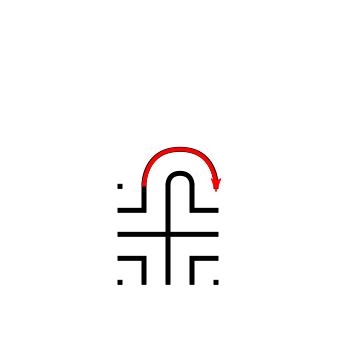
Step 2: Connect the first arch to create the goal

Draw a curved line from the top of the plus sign to the L directly to the right using an arch that extends 1 grid high. The top of the arch should peak halfway between those two points. This line will form what will become the goal of the labyrinth. As a reminder the center of the completed labyrinth will be just above this point.

How to Draw an 11 Circuit Labyrinth, step 2

Additional information to help with your drawing (Pro Tip #2)

Let’s further explain the arching pathways you will be drawing in more detail, because from now on each path you draw will require this information. Each side of the labyrinth has different alignments that create the peak arch point for each pathway. All northern pathways (shown below in red) align above the midpoint of the goal. All eastern pathways (shown in blue) align with the original top right dot in the seeding pattern. Western pathways (shown in green) align to the top left seeding pattern dot. The southern part of the labyrinth also aligns to the corner dots, one for each side (shown as purple and orange). Keep these points in mind as you create your arches/pathways.

Making an 11 Circuit Labyrinth - Showing how peaks align correctly

11 Circuit Labyrinth making tip to align the peaks

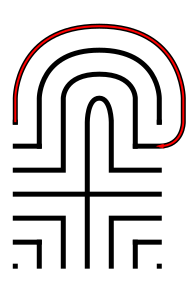
Step 3: Connect the next endpoint to the left to the next endpoint on the right

Every step from now on will be basically the same. Move one point to your left (moving counterclockwise) and connect that to the next point on the right (moving clockwise). In this case the large backwards L on the top left of the seed pattern to the small L on the top right of the seed. The arch should peak at the same point as the goal below it in the pattern.

How to Draw an 11 Circuit Labyrinth - Part 3

Step 4: Connect the next endpoint to the left to the next endpoint on the right

The small backwards L in the top left to the dot in the top right corner. The arch should peak at the same point as the goal below it in the pattern.

How to Draw an 11 Circuit Labyrinth - Part 4

Step 5: Connect the next endpoint to the left to the next endpoint on the right

The dot in the top right corner to the end of the small L in the top right corner. The arch should peak at the same point as the goal below it in the pattern.

How to Draw an 11 Circuit Labyrinth - Part 5

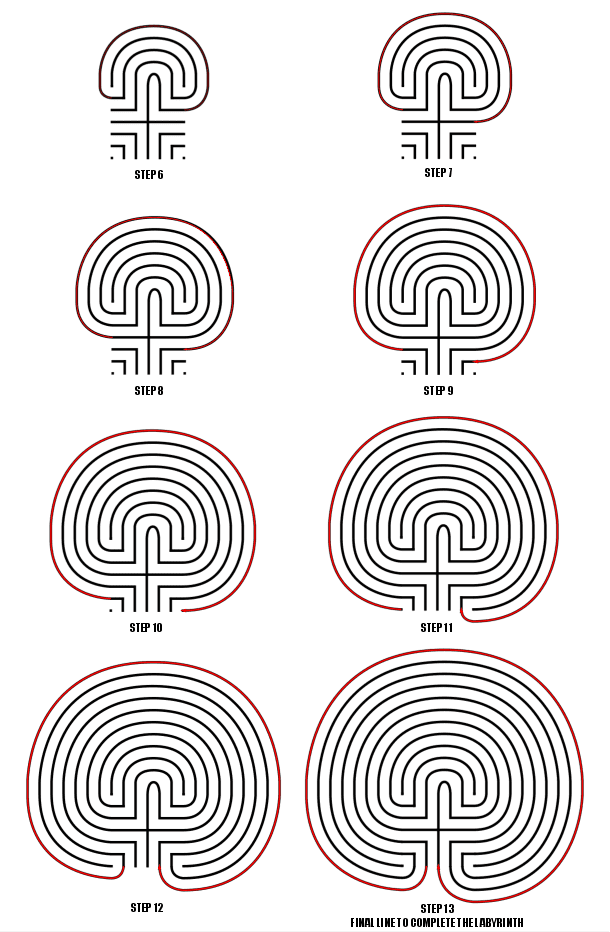
Steps 6-13: Connect the next endpoint to the left to the next endpoint on the right

I assume you have the pattern down to complete making the labyrinth with only pictures with nice red lines. Follow the graphic below to complete steps 6 - 13.

How to Draw an 11 Circuit Labyrinth - Steps 6-13

Steps 6-13

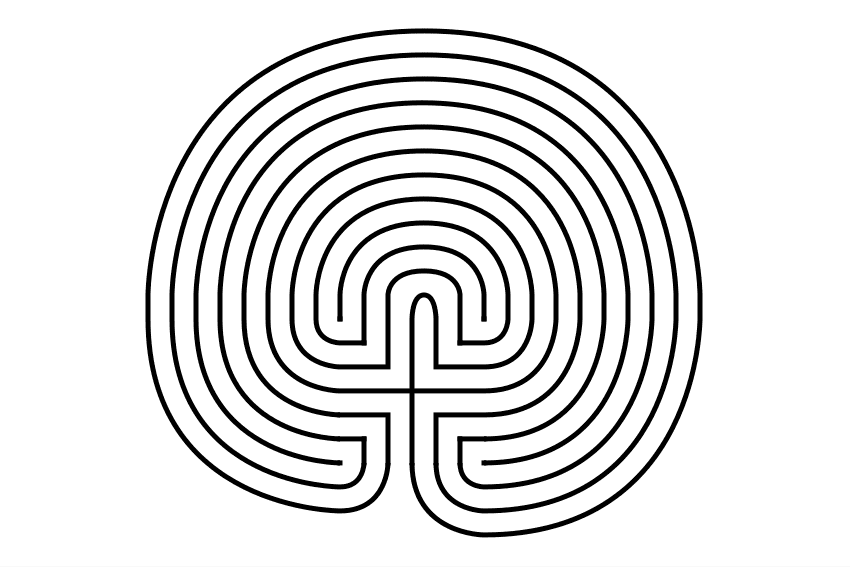
11 Circuit Classical Labyrinth

11 Circuit Classical Labyrinth

That completes the drawing of an 11 circuit classical labyrinth. It happens to be the “right handed” version of the labyrinth. If you want to make the left handed version every step above would be the same but moving to the left instead of right. Just imagine following the directions while looking in a mirror. The majority of labyrinths you see will be right handed. The laeft handed versions look odd to many people:

Left Handed 11 Circuit Classical Labyrinth

Left handed 11 circuit labyrinth

If you are interested in a comparison of Classical, Square and Circular Labyrinths the linked post will show you how they compare from a design perspective.

How To Draw an 11 Circuit Classical Labyrinth Video:

Here is a quick 2 minute video to see this in action from my YouTube channel ! Notice how the grids help with the construction !

A video showing How to Digitally Draw an 11 Circuit Classical Labyrinth