Case Study#6 - How to Improve a Maze - Uxmal

While this particular maze never made my list of abandoned mazes or mazes in need of improvement, in the time between making this maze and posting it on the site I decided to try to improve it. So, now it becomes my 6th case study.

If you want to read the previous 5 case studies:

Case Study#1 - How to Improve a Bad Maze - Tiki Totem Maze

Case Study#2 - How to Improve a Bad Maze - Danzante Conchero Chichimeca Maze

Case Study#3 - How to Improve a Bad Maze - Red Rocks Amphitheatre Maze

Case Study#4 - How to Improve a Bad Maze - The Hollywood Sign

Case Study #5 - How to Improve a Bad Maze - Severance Hall

You might notice that this blog post title dropped the “bad” maze, because in my opinion the original incarnation of the maze was not bad, just less than what it could be.

Let’s look at that maze, also known as the ‘before’. Now, I want to mention that no matter what size screen you are on it will probably not be large enough. I went max detail on this maze and it is meant to be movie poster size. I like how it looks, but it is a bit bland. Can I improve it?

Here are the enhancements I made to improve and finish the maze:

1. Resize - Any re-sizing will help the maze be seen and improve the look on a screen or when printed. Got rid of a lot of the empty space on top and bottom of the maze.

2. Grass added - I added the setting of the building (no more floating !).

3. Sky added - If you add the ground you should add the sky too!

4. Changed the grout and stone colors - The color of the ruins is what you would see if you were standing in front of them. The grout switches from black to light grey and really changes the look.

5. Change arrow colors - The black arrows no longer look good on the grass colored background so I matched them to the new maze color and that meant I should make sure the…..

6. Letter and branding changed - Re-color to match the ruins and look better against the new background.

FINAL THOUGHTS

And now the “After”. Much better maze. Still difficult to see all the detail without printing it out.

Mayan Ruins at Uxmal Maze

I think this is an improvement. What do you think ?

Maze of the Week #90 - The Mayan Ruins at Uxmal

Maze of the Week #90 takes us back to Mexico and my 2nd different maze of a pyramid or ruin with this Mayan Ruins Maze from the Uxmal archeological site in the Yucatán of Mexico. Here are my other similar mazes:

Chichen Itza Maze

Monte Albán Maze

YouTube: Here is a tourist guide to the site with some great scenes !

The Maze: I re-worked this maze after finishing it. I think the improvements improved it a bit; not a drastic change, but definitely better. The maze is large and more difficult than usual, but I held back making it extra difficult. Here is the final maze:

Mayan Ruins at Uxmal Maze

The Mayan Ruins at Uxmal Maze

I hope you enjoy the maze. Maze download is available on the homepage. Check out my YouTube channel where you can watch mazes being made and solved !!! This was my last of 5 straight mazes with case studies - I hope you enjoyed them !

Coming next week:

A maze of more Mexican ruins !

Case Study#5 - How to Improve a Bad Maze - Severance Hall

I took the time to evaluate mazes and see why they did not work and try to determine - could they be salvaged ? Today I present my 5th case study for improving one of those mazes, Severance Hall. You may recognize this maze. It was featured as Maze of the Week #79 in July. I realized I should have done a post showing the transformation previously. If you want to read the previous 4 case studies:

Case Study#1 - How to Improve a Bad Maze - Tiki Totem Maze

Case Study#2 - How to Improve a Bad Maze - Danzante Conchero Chichimeca Maze

Case Study#3 - How to Improve a Bad Maze - Red Rocks Amphitheatre Maze

Case Study#4 - How to Improve a Bad Maze - The Hollywood Sign

Here is what I wrote about the maze in the previous post on why it was abandoned:

“Abandoned Maze #3 - Severance Hall Maze

This almost maze was done before I started using perspective for just about every maze, that’s why it looks so boxy. I was in-between wanting to start from scratch or moving forward with the maze. I never made a decision and it got lost until I found it for this post. It also appears to be floating and a nondescript building. Mistake made: Using a poor method to start with. Indecision on how to move forward.”

And let’s look at that maze, also known as the ‘before’. There was no color, no maze, and it was very boxy, with the building floating on the page.

Severance Hall drawing

Here are the enhancements I made to improve and finish the maze:

1. Color added - I added color throughout the maze. I did some minor shadowing in the front of the building behind the columns. Changed the color of the window frames from black to grey to better reflect actual building.

2. Trees, bushes and grass added - I added the setting of the building (no more floating !). That meant large trees on each side of the building and a long row of bushes in front with a lawn. There is also a small pathway on the right side.

3. Sky and clouds added - I usually avoid clouds but this is Cleveland and clouds are a fact of life.

4. Added some details - The spotlight on the right side was previously missing. The year on the building “MCMXXX”. Added the name to the building.

5. Added bricks and the maze - Key to actually making this into a maze. The bricks enabled me to add the maze as their structure was used for the walls of the pathways. There are also some larger sections of concrete on the sides. Overall this changed the look of the building a lot. For the Start and Gal I went with internal but made them blue to make them a bit easier to find.

6. Letter and branding added - Added the name of the maze and added my branding in the corner.

FINAL THOUGHTS

I could have spent more time on the trees and bushes, but I think this is ok from what I started with. I think it represents the building well.

And now the “After”.

Severance Hall Mazed

I think this is an improvement. What do you think ?

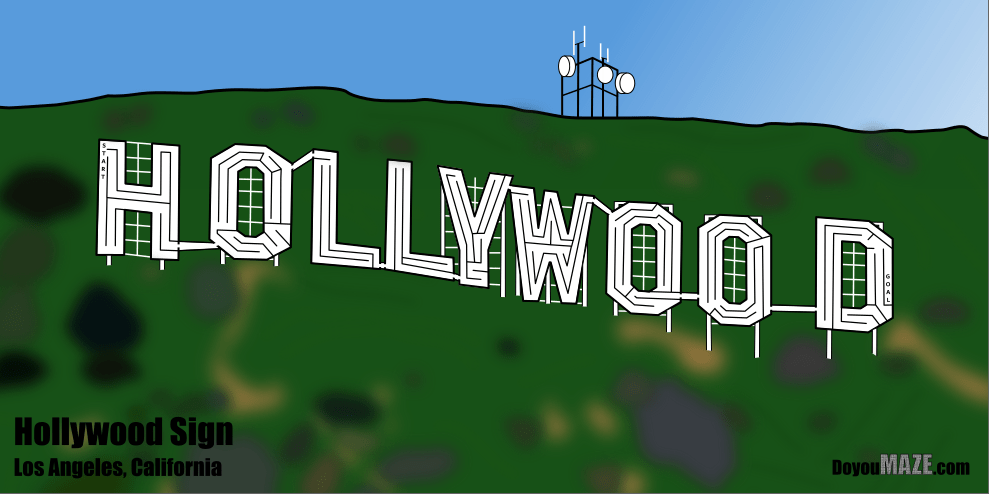
Case Study#4 - How to Improve a Bad Maze - Hollywood

I took the time to evaluate mazes and see why they did not work and try to determine - could they be salvaged ? Today I present my 4th case study for improving one of those mazes, The Hollywood Sign. If you want to read the previous 3 case studies:

Case Study#1 - How to Improve a Bad Maze - Tiki Totem Maze

Case Study#2 - How to Improve a Bad Maze - Danzante Conchero Chichimeca Maze

Case Study#3 - How to Improve a Bad Maze - Red Rocks Amphitheatre Maze

Back to this maze. Here is what I wrote about the maze in a previous post on why it was abandoned:

“Abandoned Maze #1 - The Hollywood Sign Maze

Technically could be considered a finished maze. But it is very boring. Not particularly good. It does not bring a Kondo level of joy. The maze is easy. Could it be salvaged ? Yes, probably with some color and lots of background detail - but once you see a photo of the actual sign and it’s surroundings you notice a lot of rocks/dirt and just a few bushes. The top of the hill has fences, and cellphone towers, etc. So, this COULD be salvaged, but most likely won’t be. Mistake made: Poor subject matter / poor execution

And let’s look at that maze, also known as the ‘before’. SOOOO boring.

Hollywood Sign drawing

This was a tough one. I rated the above maze a 2 out of 10. Here are the changes I made to (hopefully) improve the maze:

1. Color added - The Hollywood letters in white should pop against the background of the hill. So I colored the hill to enable the bright white letters to pop. I did 2 versions of the hill, bright green and a more normal brownish green we need rain color.

2. Tower added - I added a tower to the top of the hill. One of many possible but enough to show what is there. I did not add the fence since most people never notice it.

3. Bushes added - The slope of the hill has many different types of bushes in various shades of green/brown and grey. I added them around the hillside. I also added some outlines of ridges and some dirt trails.

4. Blur - Although when I saved the file as a png it does not save (so I use screenshots instead), I made everything on the hill that is not a letter blurry. The hillside in pictures does not have a lot of definition or detail that is important - it is just there so highlight the sign, so the blurring helps this (I hope).

5. Letter and branding added - Added the name of the maze and added my branding.

6. Sizing Change - Slight change based on how everything looked, I kept the wide shot but gave it a bit more height based on the tower/branding locations. Initial maze was 990 x 360 and is now 990 x 494, so 37% taller.

FINAL THOUGHTS

Better. Maybe this went from a 2 to a 5. A 2 never sees the light of day. A 5 only does if I see a special case for it (like this case study).

And now the “After”. The new maze in 2 colors:

Hollywood Sign Maze
Hollywood Sign Maze alternative color

I think this is an improvement. What do you think ? Do you prefer one green over the other ?