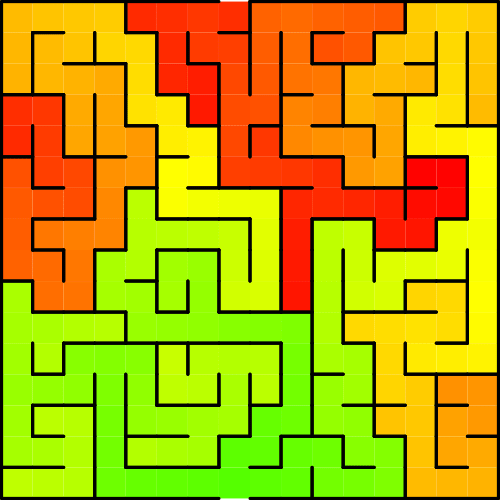
Comparison of the even MORE online maze generation websites

Previously I have reviewed and compared the top 12 maze generation websites. And that blog post gets updated often as new websites are created and replace some of the original sites. It seems to be a common logic and programming puzzle to create a website that can create a digital maze. And so, today, I am going to take the time to go through 7 MORE maze generation websites. Why ? Well I like to keep up to date on what content is out there and share it with you.

So today I will look at 7 online maze generation websites, compare them, and let you know what each is capable of. This maze generator comparison includes the (1) shape of the overall mazes, (2) the cell types or shape of the cells that create the internal paths/walls, (3/4) the width and height sizes you can generate, (5/6) how the start/end are shown, (7) are the solutions given, and (8) how can you download the maze you have generated.

To give them a good comparison I decided to generate a 20x20 maze with each to compare how each generated (when possible). I also tried to give and example of some of the advanced features if the maze generator site has them.

In no particular order:

1. all kids network

Shapes: 5 : Square

Cell types: Square

Width / Height: 9 pre-selected sizes available, smallest 5 x 5, largest 120 x 120

Start/End: Entrance and exit are labeled.

Advanced options: You can choose one of 2 styles: Simple or Artistic

Solution generated: Yes

Downloads available: Yes. Pdfs available.

This site also allows you to select your difficulty level (Easy, Medium, Hard), and to select between 11 different page sizes.

Examples: You must register and login to download mazes. Registration is free.

2. PUZZLE GeneratoRS

This site has 6 different inputs that must be filled in to make a maze. There is no information to explain how they work (Information icons did not work for me). Those inputs are labeled: Width, Height, North, East, West, and South. This site also allows you to make crossword puzzles, sudoku and word searches !

Shapes: 2 : Square, Rectangle

Cell types: 1: Square

Width: 2 - 50

Height: 2 - 50

Start: Entrance and exit are not specified, 1 of each at the top and bottom of the generation.

End: 1

Solution generated: Yes

Downloads available: Yes

Examples: Both are 20x20 squares. The left was generated using 1111 for NSEW, while the right was generated using 2222.

puzzle generators maze example
puzzle generators maze example 2

3. JAMISBUCK

This maze generator is built to generate mazes for Minecraft. This includes mazes with up to 10 layers (Think of a 3D maze with each layer being a floor to a building).

Shapes: 1 : Square

Cell types: 1: Square

Width / Height: Comes in 4 selectable sizes: Small Medium Large and Huge

Start: Entrance on the left hand side.

End: Exit in the right hand side.

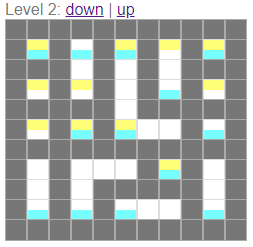
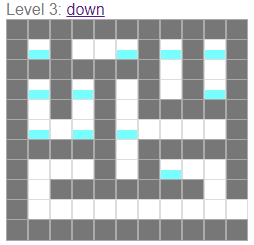
Advanced options: The levels I mentioned before add layers to the maze, allowing the solver to travel in a third direction. Note that this generates as a separate picture for each level with blocks colored to indicate where you may move up or down.

Solution generated: No

Downloads available: No

Examples: First example is Medium sized with 1 Level. The next set of 3 show a Small sized 3 level maze where yellow and blue denote the ability to move up and down.

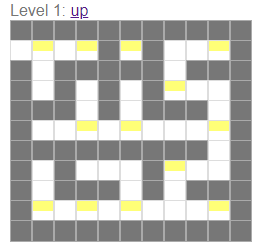
JamisBuck maze example
JamisBuck maze example small
JamisBuck maze example 3
JamisBuck maze example 4

4. Dcode Maze Generator

Shapes: 1 : Rectangle

Cell types: 1: Square

Width: 2 - 50

Height: 2 - 50

Start: Entrance and exit are not specified, 1 of each at the top and bottom of the generation.

End: 1

Advanced options: You can change the walls of your maze to be made by any character. The default maze walls are made from solid black blocks.

Solution generated: No

Downloads available: Yes

Examples: Left with the default black walls. Right with * as walls. I tried a few different symbols and find non-black walls very difficult to follow what the pathways are.

Dcode maze generator example
Dcode maze generator example 2

5. delorie

Shapes: 1 : Rectangle

Cell types: 1: Square, Rectangle

Width: 1 - 100

Height: 1 - 100

Start: Entrance and exit are not specified, 1 of each at the top and bottom of the generation.

End: Entrance and exit are not specified, 1 of each at the top and bottom of the generation.

Advanced options: You can generate a maze in Gif format (Though I could not get this to display) or using text (which uses the “+” and “-” characters). You can choose the width and height of each cell. I found if you use the default of 1 it is difficult to understand the walls of the maze.

Solution generated: Yes

Downloads available: No

Examples: Left uses a width and height of 2 per cell and is difficult to follow. The right maze is much easier to follow by changing the width per cell to 6. This generates a more square maze.

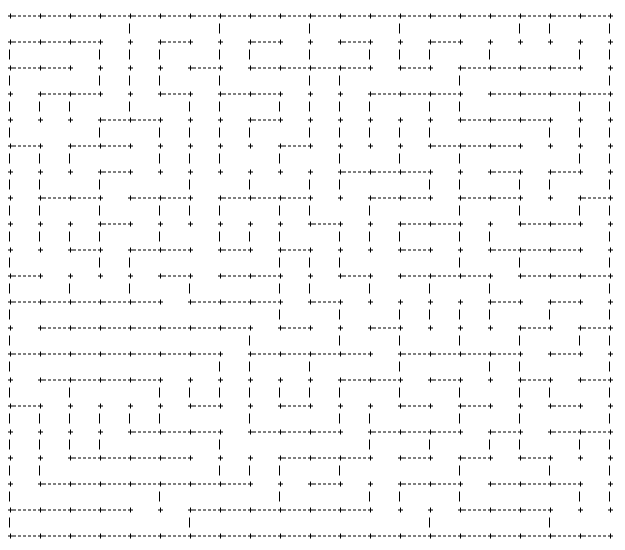
Delorie maze example

6. the teachers corner

Shapes: 1 : Rectangle

Cell types: 1: Square

Width: 10 - 50

Height: 10 - 75

Start: Entrance and exit arrows are chosen with 6 color options. Entrance generates in the top left corner.

End: Entrance and exit arrows are chosen with 6 color options. Exit generates in the bottom right corner.

Advanced options: You can add a Title and directions/instructions for the maze. Default directions are “Can you find your way through the crazy maze below?”. You can change the width of lanes, there are 5 options that vary the display size.

Solution generated: No

Downloads available: Only by right clicking to download directly from the browser. Note that the download will NOT include the start and ending arrows you see on the screen.

Other: This maze generator is part of a larger website dedicated to resources for teachers like lesson plans, activity sets and teacher resources. Great for teachers !

Examples: Each is 20 x 20.

Teachers corner maze example

7. Xefer Maze Generator

Shapes: 1 : Rectangle

Cell types: 1: Square

Width: 2 - 1000 ? At 1,000 the maze still generates.

Height: 2 - 1000 ? At 1,000 the maze still generates.

Start: Entrance and exit are not specified, 1 of each at the top and bottom of the generation.

End: 1

Advanced options: You can choose the size of the cells. You can choose the anfractuosity - roughly how much channels are important in the maze. Most mazes have high anfractuosity.

Solution generated: Yes

Downloads available: No

Examples: Left 20 x 20 has low anfractuosity. Right 20 x 20 has high anfractuosity.

Xefer maze generator example

A Comparison of the Top 12 online maze generation websites

Today I will take you thru the top results for online maze generation, compare them, and let you know what each is capable of. I used a few different search engines to find the top sites, then pared them down to the very best. This maze generator comparison includes the (1) shape of the overall mazes, (2) the cell types or shape of the cells that create the internal paths/walls, (3/4) the width and height sizes you can generate, (5/6) how the start/end are shown, (7) are the solutions given, and (8) how can you download the maze you have generated. I try to note what a website does best if something stands out.

To give them a good comparison I decided to generate a 20x20 maze with each website to compare how each generated the maze (where possible). I also tried to give an example of some of the advanced features if the maze generator website has them.

I have included a “best of” section at the end of the post if you are looking for a specific functionality from the website, like: Best Pre-Made Shapes, Best Custom Shapes and Best On-Screen Solving to name a few of the categories. These are not in order:

  1. mazegenerator

    Shapes: 4 : Rectangle, Circle, Triangular, Hexagonal

    Cell types: 3: Square, Hexagons, Triangles

    Width: 2 - 200 for rectangles, Diameter of 5 - 200 for Circles, Side length of 3 - 200 for Triangles , Sides 2 - 120 for Hexagonals

    Height: 2 - 200 for rectangles

    Start: 2 choices: Top, Bottom/Inner Room

    End: Same choices as start.

    Solution generated: Yes

    Downloads available: Yes, PDF in 6 different sizes, SVG, PNG

    What this site does best: Of all the sites I reviewed this is one of the few sites with hexagon maze generation and triangular maze generation. It also wins for the best download options once you have generated a maze with the site. The site allows you to create a large maze of 200x200, the second largest size of all the sites I have reviewed.

    Examples: On the Left is a 20 x 20 square maze and on the right is a 20 x 5 triangular maze. Left Below is a hexagonal sigma cell maze. Right below is an example of a circular maze with the solution.

Maze Generator  square shaped maze
Maze Generator triangle maze
Maze Generator  hexagonal shaped maze
Maze Generator circular maze with solution

2. CODEBOX

Shapes: 4+ (infinite) : Square, Circle, Triangular Grid, Hexagonal Grid. While there are 4 main types you can also create an infinite number of shapes using the mask feature !!

Cell types: 3: Square, Hexagons, Triangles

Width and Height: 2 - 50 for squares and hexagons, Triangles from 4-85 width to 2-50 height, and circles can have 30 layers

Start/end: 4 choices: None, Top to Bottom, Left to Right, Hardest entrance/exit

Solution generated: Yes

Downloads available: Yes, as an SVG file.

What this site does best: Of all the sites I reviewed this is one of only 2 sites with Circular maze generation. It is also the site with the most flexibility in creating shapes. You can create a distance map that shows how far the point is from the entrance. The generator offers a choice of 10 different algorithms to generate the maze. You can also solve these mazes on screen using your mouse and keyboard. You can also choose to watch the maze generate !

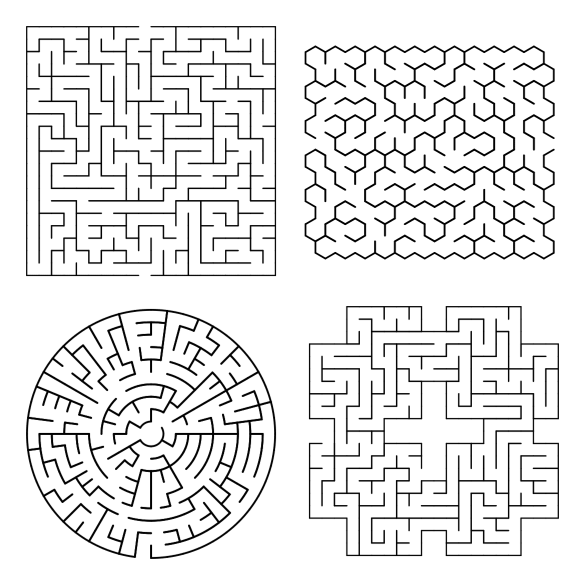
Examples: Starting in the top left corner a simple 20x20 maze, a hexagonal grid maze, a circular maze, and a shape I made myself using the mask feature. I also suggest you check out the examples given on the site.

Codebox maze generation examples

3. Discovery Education Puzzlemaker

Shapes: 5 : Rectangle, Circle/Oval, Wheel, Escape from middle, Cut Out

Cell types: Square

Width: 2 - 100

Height: 2 - 100

Start: Entrance and exit are not specified, 1 of each. If internal option is not used they will be on the left and right.

End: 1

Advanced options: You can name your maze. It’s actually their step #1. You can chose the direction of the internal pathways (6 options, including random, mostly horizontal and mostly vertical).

Solution generated: Yes

Downloads available: Yes. They have added buttons to make Copying the Maze to your clipboard simple. Also includes a Print button directly on the page.

What this site does best: Allows the creation of a large size 100 x 100 maze.

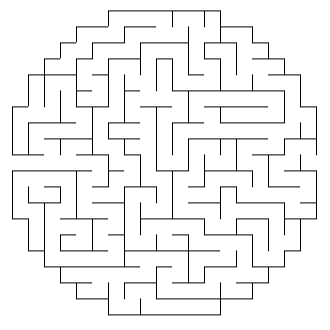
Examples: On the left is a 20 x 20 square maze. On the right is a ‘circular’ maze that is made using a square grid system (For a true circular maze see above). Bottom left is an example of a 20 x20 cutout and bottom right is the wheel version.

Additional Information: This is part of the Discovery Education Puzzlemaker page. You can generate 10 different puzzle types : Word Search, Criss Cross, Double Puzzles, Fallen Phrase, Math Squares, Mazes, Letter Tiles, Cryptograms, Number Blocks and Hidden Message puzzles. It is easy to see why this site is popular with such great content !

Discovery Education square maze
Discovery Education circular maze
Discovery Education cutout shape maze
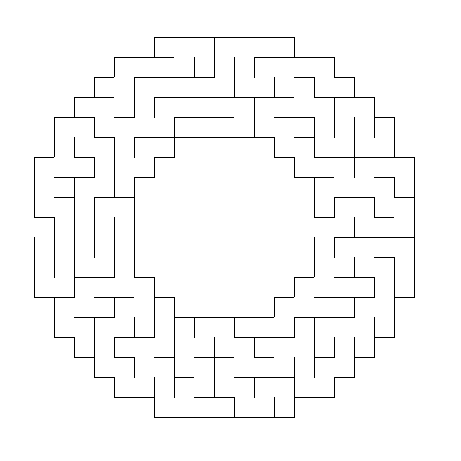
Discovery Education donut shaped maze

4. ANGELIKA TYBORSKA

You can learn about Angelika and her projects here, including this maze generator she made ”just for fun”.

Shapes: 5+ : Square, Hexagon, Triangle, Circle, Star - which allows you to upload a mask to create your own shape

Cell types: Automatic based on shape of maze. Square, hexagonal, and triangular.

Width: 2 - 50

Height: 2 - 50

Note that for the circle and hexagon shapes you choose the radius (up to 30) and the triangle the side length (up to 30)

Start/Goal: Entrance and exit are not specified, but each is signified by internal dots.

Advanced options: You can choose the algorithm used to generate the pathways, of which there are 6 different options. You can generate a solution “heat map” showing the distance from the entrance of the maze.

Solution generated: Yes

Downloads available: Yes, in SVG format

What this site does best: It does a great job with custom shapes (you can upload your own mask), and with common shapes like the circle, hexagon, and triangle.

Examples: 20x20 Square using Recursive backtracker algorithm, 10 radius hexagonal with solution and “heat map”.

Angelika maze making examples

5. Mazesforfun

Shapes: 9 selectable shapes: including Square, Triangle and Round

Cell types: Automatic based on selected shape

Width: 10 - 40

Height: 10 - 40

Start: Unmarked but always the top left of the shape

End: Unmarked but always the bottom right of the maze

Advanced options: There are 4 levels of difficulty. You can also choose the size the maze generates in (3 possible).

Solution generated: Yes

Downloads available: Yes, in PDF, PNG, and SVG formats

What this site does best: The ability to mix and match internal shapes and external shapes. It also has 9 selectable pre-made shape templates.

Examples: First is a standard 20 x 20 square (difficulty hard); next is what generates for triangles - not the external shape but the CELL shape. The final 2 examples show a shape called Cairo and on called Squaretriangles.

mazesforfun square maze
mazesforfun maze example
mazesforfun maze example 2
mazesforfun maze example 3

6. billsgames.com

Shapes: 1 : Rectangle

Cell types: 1: Square

Width: 21 - 301

Height: 21 - 201

Start: Entrance and exit are not specified, and placement varies by maze.

End: 1. I think I have generated mazes with no exit !!! I could be wrong but it was difficult to find if it was there !

Advanced options: There are 3 options for mazes generation: Simplistic, Harder and Chaotic. Pictures are sometimes randomly inserted on the mazes. I have seen Griffins, a plane, a house, etc. Has a secondary playable option where you can play on screen and try to solve an invisible maze !

Solution generated: No

Downloads available: Only by right clicking to download directly from the browser

Examples: each maze is 21 x 21 (really? - well that is what the settings said !). The maze on the left generated extremely easy…. The maze on the right was generated using the chaotic setting. Unfortunately, each of these mazes are very easy to solve. Be sure to check to see if the generation you use is difficult enough.

Bills Games maze examples

7. mazepuzzlemaker

You’ll notice the controls of this website are very similar to Printable creative above with some additional options available. This is available to be used for commercial uses and is the PAID version of the site above.

Shapes: 55 selectable shapes, including letters A-Z, and many more; 4 geometric; 29 Fancy shapes

Cell types: Square

Width/Height: You can choose between 10-30 “cells”

Start: automatically generated at top and bottom of the maze shape

End: Start/end can be turned on, showing a green and red box to indicate the start/goal

Solution generated: Yes

Downloads available: Paid. Yes, PDF in multiple sizes, PNG and SVG

What this site does best: Creates puzzles for commercial use. Has a large amount of fancy shapes available. Gives more examples than any other website (by a wide margin).

Examples: The best way to check out is to view their page of examples, featuring 82 different examples !! Here is a snapshot of that page to give you a small sampling:

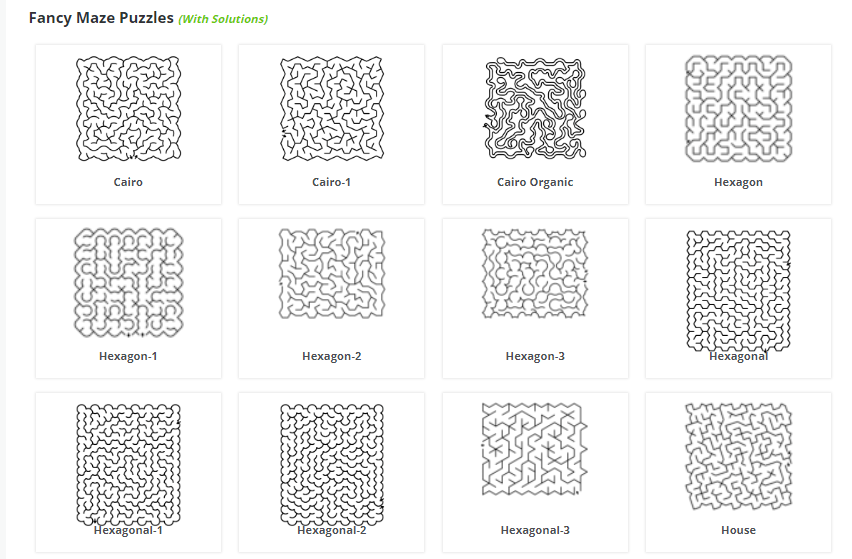
Mazepuzzlemaker maze examples

8. Glass Giant

Shapes: 1 : Square

Cell types: 1: Square

Width: 2 - 40

Height: 2 - 40

Start: Marked by a green diamond INSIDE the maze

End: Marked by a red square INSIDE the maze.

Advanced options: There are 5 levels of difficulty. You can choose the color of the maze walls and the background color (9 colors available). You can also choose the size the maze generates in.

Solution generated: No

Downloads available: Only by right clicking to download directly from the browser

Examples: Left is a standard 20 x 20 maze and on the right is a 20 x 20 maze with the options for Red walls on a Cyan background selected.

Glass Giant square maze
Glass Giant cyan colored square maze

9. printablecreative

Shapes: 11 : Box, Circle, Diamond, 4 Rooms, L, Moon, Square, Star, Strike Triangle, 2 Rooms

Cell types: 1: Square

Width/Height: You can choose between 10-30 “cells” for the free version

Start: automatically generated at top and bottom of the maze shape

End: Start/end can be turned on, showing a green and red box to indicate the start/goal

Solution generated: Yes

Downloads available: Yes, PDF in 2 different sizes, PNG

This maze generator also allows you to pick the size of the cell corridor (10-30) adjusting the scale of the maze you generate. It also has 3 difficulty levels (Easy, Normal, Hard).

What this site does best: They have their own page of maze examples featuring 19 options ! It also features 11 pre-made shapes.

Examples: The top 2 show the Start and Goal indicators. Shapes in the examples are Square, Two Rooms, Circle and L.

printablecreative  square maze
printablecreative 2 rooms maze example
printablecreative circle maze example
printablecreative L shaped maze

10. Here and above

Shapes: 1 : Rectangle

Cell types: 1: Square, Rectangle

Width: 2 - 500. Note that I made a 500 X 500 successfully, but at higher numbers you may get an error.

Height: 2 - 500

Start: Entrance and exit are not specified, and may be on any side of the maze.

End: 1

Advanced options: You can choose wall and path widths. You can generate a maze in many colors (basically every color) using the RGB system. That is one thing that sets this site apart from all others - every color is available to make a maze in.

Solution generated: No

Downloads available: Only by right clicking to download directly from the browser

What this site does best: Large sizes - this website generates the largest mazes that I have found ! And the ability to use any color you can think of using an RBG selector.

Examples:

Here and Above  square maze example
Here and Above red square maze example

11. KIDEV

Things are different here compared to the other websites. On this site the solving of the mazes happens ON SCREEN. If that is what you are looking for, this is the site for you ! Also includes sections of Puzzles, Learning (Letters and Numbers), Drawing and a Code game. The mazes all feature themes as you will see in the examples !

Shapes: 34+ : 34 different styles of maze are currently available to be generated, plus a 27 predefined shapes in the Shapes section that allows you to create your own shapes.

Cell types:: Many. The 34 shapes include some unique inner cell shapes that are best explored on your own !!

Width and Height: Varies, but you do not control the output size for the 33 styles generated. However, under the Create button you can control the X and Y to create a maze in the size you want.

Start: Pre-defined in Style mazes

End: Pre-defined in Style mazes, internal or external in the Create section

Solution generated: No

Downloads available: Mazes are both shareable and Printable

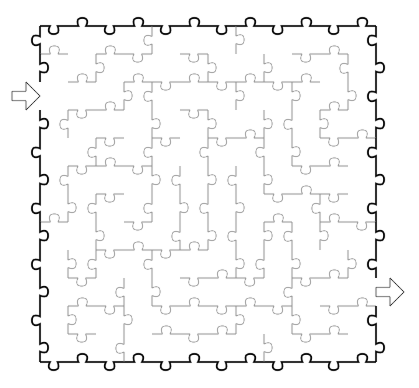
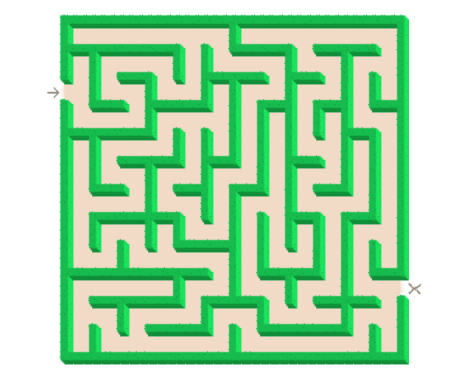
Examples: 4 of the 33 styles are shown below. Rail, SawBlade, Jigsaw, and Corn mazes.

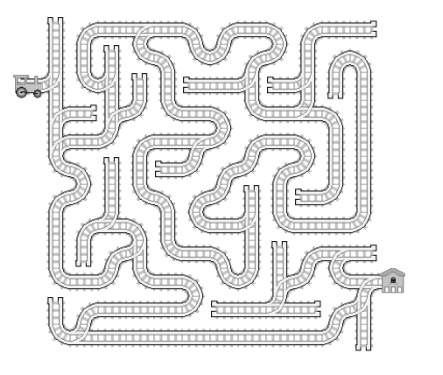
maze4u train track maze
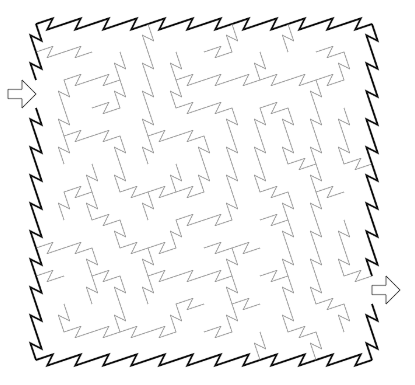
maze4u sawblade maze example
maze4u puzzle shape maze example
maze4u hedges maze example

12. mazebrite

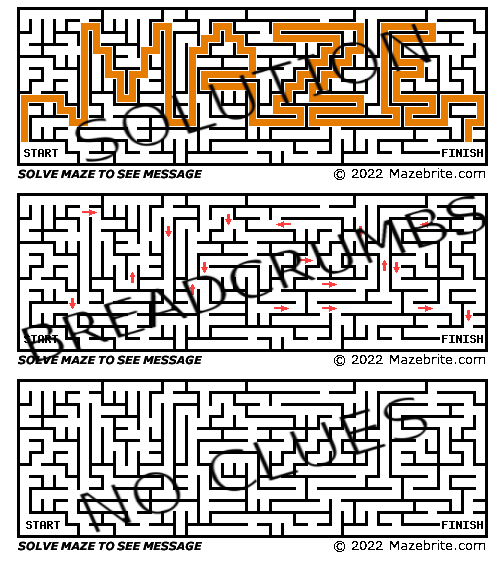
This is a custom maze message generator. You can make your name, or a message like “I love you”. Downloads are available for a fee.

Shapes: 1 : Rectangle

Cell types: 1: Square

Width: Based on the length of message.

Height: 13, 24, or 35 depending on the length of the message

Start / Finish : Are written and located inside the maze. Start in the bottom left corner, Finish in the bottom right

Solution generated: Yes. You may also select from 8 colors.

Downloads available: It costs 99 cents to email yourself 3 versions of the maze.

Example: Shows the three versions for the word “MAZE”, as labeled, the solution, with helpful arrows (Breadcrumbs), and with no clues.

MazeBrite Maze examples

That concludes the reviews, but if you are interested in additional sites I have a second blog post about sites that did not make this list.

BEST MAZE GENERATORS FOR:

  • CATEGORY: SHAPES

Best pre-made shapes:

MAZEPUZZLEMAKER - features 55 selectable shapes, including letters A-Z; 4 geometric shapes; 29 fancy shapes

KIDEV - 35 variations come in many different unique forms

PRINTABLECREATIVE - drop down menu contains 11 options

MAZESFORFUN - 9 options that include unique internal pathways giving mazes a fresh look

Most unique pre-fabricated shapes:

KIDEV - you can find Rail, Pipe, Jigsaw, and Corn mazes among a large selection.

MAZEPUZZLEMAKER 29 fancy options - The best way to check out is to view their page of examples.

MAZESFORFUN the internal shapes that are generated are unique

Best custom shapes:

CODEBOX - Click on Create Mask button and make your own maze shape !

KIDEV - you can load shapes and customize them !

ANGELIKA TYBORSKA - click on the Star shape and you can upload a PNG file with a custom mask

Largest rectangular maze creation available:

  1. 500 x 500 HERE AND ABOVE

  2. 200 x 200 MAZEGENERATOR

  3. 120 x 120 ALL KIDS NETWORK (not reviewed above)

  4. 100 x 100 DISCOVERY EDUCATION PUZZLEMAKER

Best circular mazes:

MAZEGENERATOR

CODEBOX

ANGELIKA TYBORSKA

Best triangular shaped mazes:

MAZEGENERATOR

ANGELIKA TYBORSKA

Best hexagonal shaped mazes:

MAZEGENERATOR

ANGELIKA TYBORSKA

CODEBOX

OTHER CATEGORIES

Best on screen solving:

KIDEV - use a pencil on screen to solve a generated maze, or select from 40 other icons

CODEBOX - click the Play button after generating a maze to solve using your keyboard or mouse

BILLSGAMES.COM - specifically for the invisible option

Best colors available:

HERE AND ABOVE - you can choose the RBG for both the pathways and walls

GLASS GIANT - you can choose from 8 colors for the background and foreground

Best novelty mazes:

KIDEV - really interesting themes that kids would love !

Best hidden message maze generator:

MAZEBRITE

If you have a website you think I have missed and deserves a look, please drop me a note and I will evaluate it for possible inclusion !

Other popular posts you may like:

How to make a digital maze (40 different types)

The 18 Best Maze Movies

What I use to make my mazes

How to Make a Math Addition Trail Maze

Today I will share with you how to make a variation on the popular Math maze construction that I call an Addition Trail Maze. While a math maze can use dozens of different calculations to solve it, the addition trail maze uses only one, addition. Let’s define what I mean, then get into the example. First, here is my definition of the 2 types of Math Mazes:

Math Maze - A type of number maze where moving from the Start to the Goal is done by correctly answering math problems to move in the correct direction.

Addition Trail Maze - A type of math maze where you move from Start to Goal by adding numbers along the way (the trail) to hit a specific goal number.

How to Make a Math Addition Trail Maze

Step 1 - Draw the Outline

This maze type is not conducive to outline or shapes so I will use a traditional grid-like pattern to illustrate the creation. The outline I use in the example and the most common is a simple square or rectangle, although it can be made in any gridded shape.

Step 1.5 - Choose the Start and Goal

I like using a START and GOAL within the maze placed inside the grid. I choose opposite side of the structure.

square with start and goal written in it

Step 2 - Add pathway walls

Next I add pathways to create trails that will become the framework for possible pathways. This choice will determine what possible outcomes at available to you. Notice that I limit the options with a bottleneck between the 3rd and 4th columns. Although the grid I was working with is not shown, this is a 5x5 grid.

Making a maze step 2

As a creator the next few steps happen as part of the design process, but will not be part of the final maze. They are planning steps to create a workable maze.

Step 3 (Planning step 1) - Break the trails into sections

Create sections (mine are in bubbles) which are options that can be moved to. I labeled them with letters. From the START you have 2 options to move in, into section A or into section B. If you move in direction A you will move through 4 blocks before making another decision. If you move onto B you immediately have another decision to make, D or E. When you make your sections for the first time you will make a mistake or 2. The most common mistake is including a block into a section where it does not belong. For example: If you are in A, you MUST next move to C, but C is not part of A. If you move from B to D you also MUST move to C, but C is also not part of D. C must be independent.

Notice that the bottleneck I mentioned in Step 2 is now labeled F and must be used in any solution.

Maze sections illustration

Step 4 (Planning step 2)- Create a decision tree

I made a decision tree to show the possible pathways that can be taken based on my maze construction. To make this easier to see I did not combine common branches i.e. each branch ends with it’s own FMK sequence instead of one common branch. This tells me that I have 8 possible trails to follow which are:

BEFM, BEFK

BDCGFM, BDCGFK

ACGFM, ACGFK

ACDBEFM, ACDBEFK

illustration of possible maze pathways

Step 5 (Planning Step 3) - Add numbers to the sections

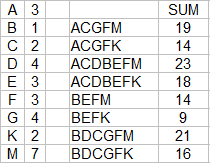
Use the 8 possible solutions we found above and assign values to each letter which will create the 8 numbered solutions. Then convert those numbers into the appropriate section of the maze. If plug these into a spreadsheet I can write some formulas to calculate the possible answers. Here is what I used, and their answers:

Chart of possible pathways

I can adjust the numbers of each letter as needed to create different sums.

And here are those letters converted to numbers in the actual maze. I used all small numbers, but that is obviously not necessary:

Math Sum Trail Maze sectioned

Step 6 - Delete background items

Clean-up the trail maze and come to a final addition trail maze construction.

Math Sum Trail Maze

Step 7 - Add Directions

Add directions to explain to the solver how they can move through the maze. Because you have already made the solution tree in the planning process, this is the time you pick which solution will be the correct one. Because there are 2 possible solutions for 14 I did not pick that number !

Math Sum Trail Maze example

Addition trail maze

Step 8 - Create a Final Solution

Highlight the correct path in the final version of the maze to create the final maze solution (shown here in gold).

Math Sum Trail Maze example solution

Note that the final maze is a 5x5 grid, using 23 of the 25 blocks for possible solutions. Let’s look at an abbreviated example to see how a few changes effect things.

Additional Math Trail Maze Example

Here I am using a 6x6 grid and a different internal wall structure which is much more complicated. Going from 23 blocks to 34 blocks really gives us so many more options. We had 8 possible pathway solutions above, any guess how many solutions this maze will have? Here are the abbreviated steps to give you a sense of what I mean.

Steps 1, 2, and 3 Outline, walls, and section the pathways

I have combined the steps for brevity. The walls I used have more gaps and so this leads to more possible pathways. The number of possible sections in our first example was 9 (as shown by having 9 different letters) and here it is 18.

Math Sum Trail Maze sections shown

This can be seen in the decision tree below. I did the pathways for B before A. You see a full tree for B while A is abbreviated using those findings so we have a smaller tree to look at. The M, G and U that are colored on the B side of the tree is repeated for the A side, aligning to the colored m, g, and u. Circles reflect the goal. B has 12 ways to reach the goal, as does A, so 24 possible pathways. So that is our answer, 8 possible solutions become 24 with just a slightly larger maze size!

Maze pathway visualization

Here is the spreadsheet I made with possible solutions. With some formulas you can play with the #’s that correspond to each letter and see the possible answers change in real time.

Math Sum Trail Maze Chart of possible solutions

Step 5 Add numbers to the sections

Yes I added some negative numbers into the mix. It adds a nice twist to the possible pathways and solutions. It gives the solver more strategy to use in how they move through the maze.

Math Sum Trail Maze sectioned with numbers

Steps 6, 7 - Delete guides and add directions

I chose 39 as my solution. But I should mention that choosing the largest number you calculate in your spreadsheet is also fun. The smallest number tends to be easier to solve and I do not suggest you use it unless you use many large negative numbers to hide the solution well. There is also some intelligent design you can use by making some sections look different than they may actually be (e.g. a large number followed by some small negative numbers to even everything out).

Math Sum Trail Maze example #2

So that completes the instruction. I hope you enjoy making your own Math Addition Maze !

Here is an early example I made (still called a Math Maze at the time) I am including so you can practice breaking the maze into sections. Good Luck ! The answer is immediately below.

Math Sum Trail Maze example #3

Let’s see how you did:

Math Maze Example Sums Sectioned

Other posts you may be interested in:

Mazes of all 50 US states for Kids, each maze includes the state capital, year of statehood, state motto and more.

A collection of free downloadable Kids Activity Books.

Step by step instructions on how to make over 40 different types of maze.

Instructions on how to make labyrinths.

Codebox maze generator review

Today we have a new maze generator to review. I think you are going to like this one because it has so much more functionality than most I have seen online.

I will be using the same format I have used for my review of the top maze generators and am adding this review to the main blog post. If you are not familiar with that post I will look at what shapes of maze are available, the cell types, size, choices to start and end the maze, is the solution given and can you download it. Let’s get to the site review.

CODEBOX

Shapes: 4+ : Square, Circle, Triangular Grid, Hexagonal Grid. While there are 4 main types you can also create an infinite number of shapes using the mask feature !!

Cell types: 3: Square, Hexagons, Triangles

Width and Height: 2 - 50 for squares and hexagons, Triangles from 4-85 width to 2-50 height, and circles can have 30 layers

Start/end: 4 choices: None, Top to Bottom, Left to Right, Hardest entrance/exit

Solution generated: Yes

Downloads available: Yes, as an SVG file.

What this site does best: Of all the sites I reviewed this is one of only 2 sites with Circular maze generation. It is also the site with the most flexibility in creating shapes. You can create a distance map that shows how far the point is from the entrance. The generator offers a choice of 10 different algorithms to generate the maze. You can also solve these mazes on screen using your mouse and keyboard. You can also choose to watch the maze generate !

Examples: Starting in the top left corner a simple 20x20 maze, a hexagonal grid maze, a circular maze, and a shape I made myself using the mask feature. I also suggest you check out the examples given on the site.

4 Codebox maze examples

Finally here is a look at an example of a distance map. From the bottom entrance in green to the top exit in red (generally).

Codebox distance map example

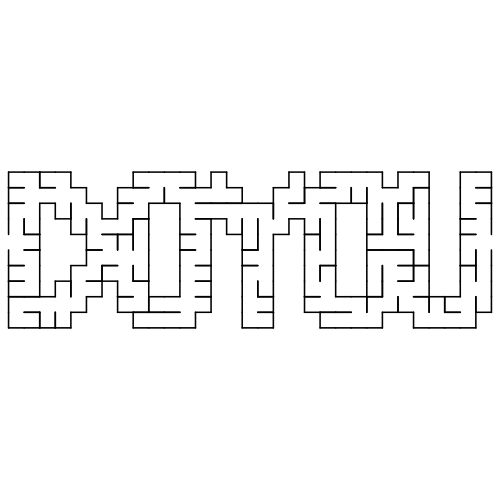
I couldn’t resist making a “do you” maze using the mask feature.

DOYOU maze from Codebox website

This is an excellent website for generating mazes. I recommend it.