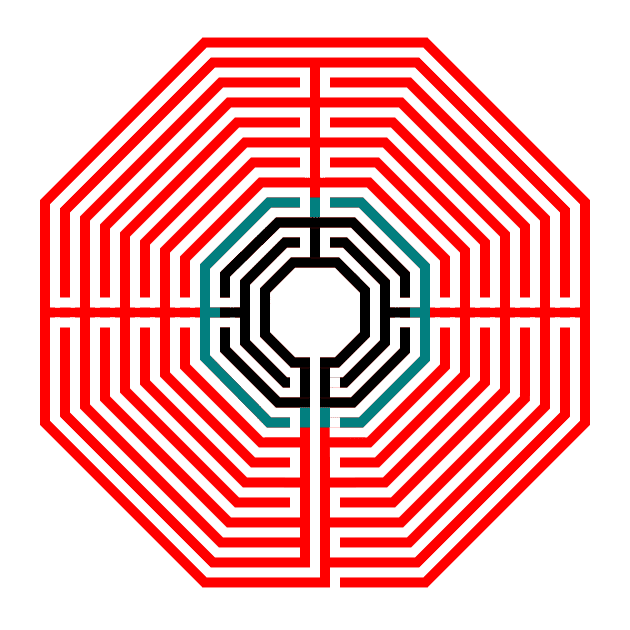
How to Make Octagonal Labyrinths

Sometimes you need to talk about failure. Today I will do just that. I have done almost a dozen different step by step instructions on How to Draw a Labyrinth. And I set out to add some additional content by adding an octagonal version to add to the classical, square and circular versions.

My first step was making the labyrinth myself. I sat down and did it….slowly and with many starts and stops. Do you know how to draw an octagon with equal sides ? I looked into it. Once I drew the first labyrinth I knew the second would be easier, and it was…a little bit. Then I drew another, and another. And finally I figured out how to easily give you step by step instructions on how to make the octagonal labyrinth ! Except for me it has still not become easy. Maybe a few more designs and I’ll figure it out completely.

So why are we here ? Well I’m going to show you what I learned to help you make your own. Here is everything included in this post (with links to skip ahead if you choose)

PART 1 - HOW TO DRAW AN OCTAGON - METHOD 1

PART 2 - HOW TO DRAW AN OCTAGON - METHOD 2

PART 3 - HOW TO DRAW A 5 CIRCUIT OCTAGONAL LABYRINTH - METHOD 1

PART 4 - HOW TO DRAW A 5 CIRCUIT OCTAGONAL LABYRINTH - METHOD 2

PART 5 - HOW TO DRAW AN 11 CIRCUIT OCTAGONAL LABYRINTH - METHOD 1 &2

PART 6 - DISCUSSION OF TURNBACKS AND LABYRINTH ORIENTATION

PART 7 - REAL WORLD OCTAGONAL LABYRINTH EXAMPLES

PART 1 - HOW TO DRAW AN OCTAGON - METHOD 1

If you want to draw an octagon with equal lengths here is the method I would use.

Step 1 Draw a straight line

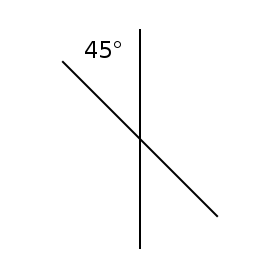
Step 2 Rotate the line 45 degrees

Obviously this is a digital method where you can copy and paste then rotate, but it also works if you are hand drawing. Use a pencil and protractor/ruler and ensure you use the same length line.

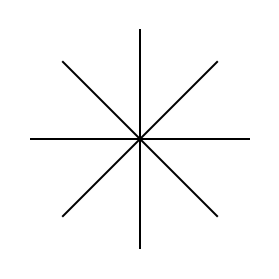
Step 3/4 Rotate the line twice more at 45 degrees

This will create what looks like an asterisk. Or a cut pizza that has no crust (maybe I’m hungry?)

vertical line

Step 1 Draw a line

vertical line with line at 45 degrees

Step 2 Rotate 45 degrees

4 lines forming an asterix

Step 3 & 4 Rotate 45 degrees again

Step 5 Connect the ends of the lines

This will create outer walls of the octagon that are the same length.
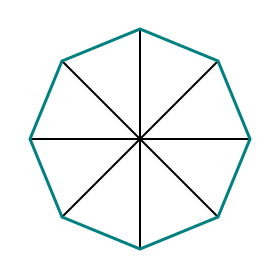
how to make an octagon using lines

Connect the ends of the lines

Step 6 Delete the original lines & (optional) rotate

After deleting the guidelines, rotate the octagon 22.5 degrees so you have the bottom side flat on the page. I will mention that if you are drawing an octagonal labyrinth you may want to keep the lines to help guide you drawing that (explanation later in the post).

octagon made from aqua lines
 

PART 2 - HOW TO DRAW AN OCTAGON - METHOD 2

Alternatively you can also use a grid to draw an octagon that is “eyeballed” and has sides that are not quite equal. I will help you some with the math of that and show you how to get your sides very close. We start with the Isosceles Right Angle Triangle. On the left we have the formulas to calculate the length of the long side of the triangle, or if you remember from your school days the hypotenuse (the square root of 2 multiplied times the length). On the example on the right if the length of the sides are 8 this means the hypotenuse of the triangle is 11.3 units in length.

Wait, why are we talking about this ? Because if you use a grid to make an octagon the distance between the diagonals should not be equal to the length of the sides.

Isosceles Right Triangle
Octagonal Right Angle calculated

Check out this overlay of our blue original equal side octagon with the red drawn using a grid that uses 4 grid blocks to draw the sides. Each diagonal is too long. The length of 4 grids used is 4 DIAGONAL grids which are different than 4 vertical / horizontal grid lengths (because of the math). So you need to calculate the estimated length of the diagonal.
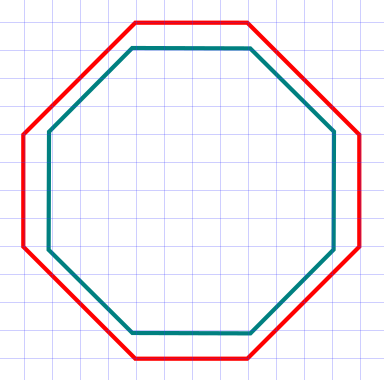
Octagonal shape eyeball example

I did the math for you to calculate what grid lengths work best. The chart is on the left. With walls of 5 unit length, the Isosceles Right Angle Triangle hypotenuse length is calculated as 7.07 units (close enough that I would use this to draw an octagon). I highlighted the 4 that would work best in yellow.

On the right I show how these calculations translate into drawing on a grid. You reverse the lengths from the chart to draw your sides. So a 7 unit grid length is paired with a 5 grid diagonal (which is actually a length of 7.07). Similarly a 10 unit length paired with a 7 grid diagonal (actually length 9.9) also works. So using this math you can draw your own octagonal using grids and 45 degree angles.

Octagonal length calculation chart
Octagonal length measurement

I had planned on showing a second example comparing an octagon draw using the first method with one drawn using the second and the 5/7 grid calculation. When I aligned them they were virtually exact overlaps. So it works. Now we have our basic shape.

So everything is smooth sailing from here then ? Right ? No. Aligning the internal pathways correctly can best be described as trial and error. Why ? Because once you have your octagon drawn the internal walls might not line up the way you want with the grid you are working on.

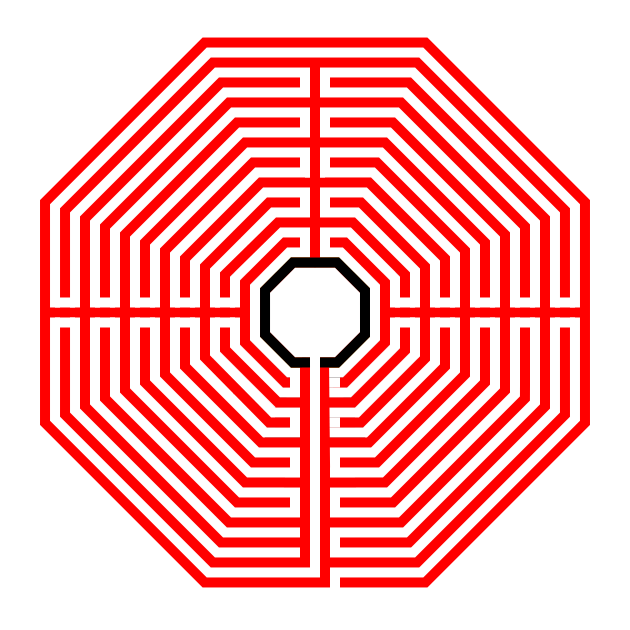
I wanted to draw an octagonal labyrinth with the walls and pathways of equal width at an equal width apart (similar to a standard equal maze if you are familiar with that construction). I think it looks best visually. If you are not concerned with that aesthetic you should be able to eyeball your labyrinth together much easier. Here is a standard equal labyrinth that I made that has 4 sections (4 internal turn-backs).

5 circuit octagonal labyrinth

If you are eyeballing the drawing of this type of labyrinth, I suggest you start with the center goal portion and work your way out in layers. Could you design in the opposite direction, from the outside in ? Of course you can ! BUT, you may run out of room for your center goal ! If you go inside out, you only run out of room if you are using a piece of paper that is too small (and digitally you would never run out of room) !!

Also I want you to notice where the walls of the labyrinth make their turns. I have highlighted them below in red - If you made your Octagon using Method 1 above you will notice that the walls turn at the exact point it touches the line used to draw the octagon !! Keep this in mind as you draw your labyrinth ! You may also want to keep the original guides with this in mind.

5 circuit octagonal labyrinth showing how it is constructed

Normally, when I give step by step instructions I give specific advice and directions that work to draw an object (relatively) easily. Today, I give you instructions that will work, but will take some trial and error on your part !


PART 3 - HOW TO DRAW A 5 CIRCUIT OCTAGONAL LABYRINTH - METHOD 1

This method can de done digitally or with a writing utensil. If you are drawing digitally and can “erase” I suggest you start with method 2.

Step 1 Draw a Center Octagon (The Goal)

Now that you know how to draw a good octagon let’s get started drawing our labyrinth with one that will create our goal. There is only 1 alteration that you need to make. In the bottom side of the labyrinth, leave a gap in the center for the final pathway. In my example that gap is equal to the width of the line I used to make my octagon.

Octagon with small break

Step 1 - Draw an octagon (with a gap)

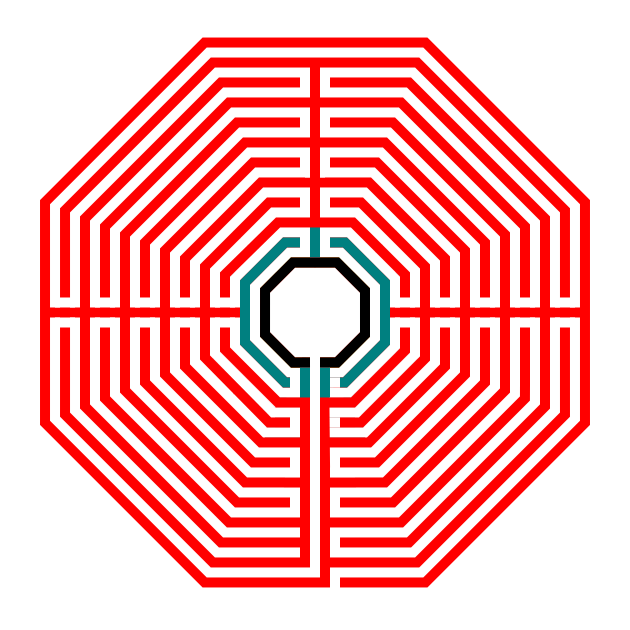
IMPORTANT: From now on the examples will be formed in the following way: Black - previously drawn sections. Blue - current section you are creating. Red - future sections.

Step 2 Draw the first layer from the goal

This layer, shown in blue below consists of what look like brackets on each side of the center. Mine are an equal distance from the initial octagon. However you’ll notice that there are gaps at the top and bottom of the brackets. How do you know where these should start and stop ? For the top of the octagon, draw a centered line equal to 3X width of your walls. The brackets will end 1X width length away from that line (this creates your turnaround point). For the bottom section draw 2 lines down from the entrance to the goal also 3X width of the walls. Again your brackets will end 1X width away from them.

Making an octagonal labyrinth step 2

Step 3 Draw the second layer from the goal

This set of brackets is on a north south orientation. To determine where these end, draw a line centered on the right/left side of the previous bracket that measures 2X width. End brackets 1X width away from the these lines. Also, because of the pathway to the goal you will also need to leave a gap in the center of the bottom bracket !

Making an octagonal labyrinth step 3

Step 4 Draw the next layer

We return to the side brackets. We extend our north and south lines by 2X width. We extend and connect our left and right centered lines.

Making an octagonal labyrinth step 4

Step 5 Draw the next layer

North and south brackets. Extend the left and right centered lines.

Making an octagonal labyrinth step 5

Step 6 Draw the final outer edge

This final step has some changes to note. In the bottom section of the labyrinth, the the final pathway leading to the goal finally turns into the labyrinth. The only gap is the entrance, directly to the right of the final pathway goal wall. Also note that there is no extension of the wall at due north. This completes the drawing of the octagonal labyrinth.
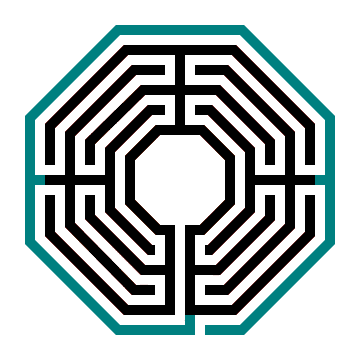
Making an octagonal labyrinth step 6

Here is the final version with all lines in black.

5 circuit octagonal labyrinth

A note about size. You can add additional steps if you would like, just continually adding internal sections until you are ready to finish the labyrinth by adding a final edge with an entrance.


PART 4 - HOW TO DRAW A 5 CIRCUIT OCTAGONAL LABYRINTH - METHOD 2

The following method works for digital constructions. It uses a draw and cut construction. It is entirely written for brevity.

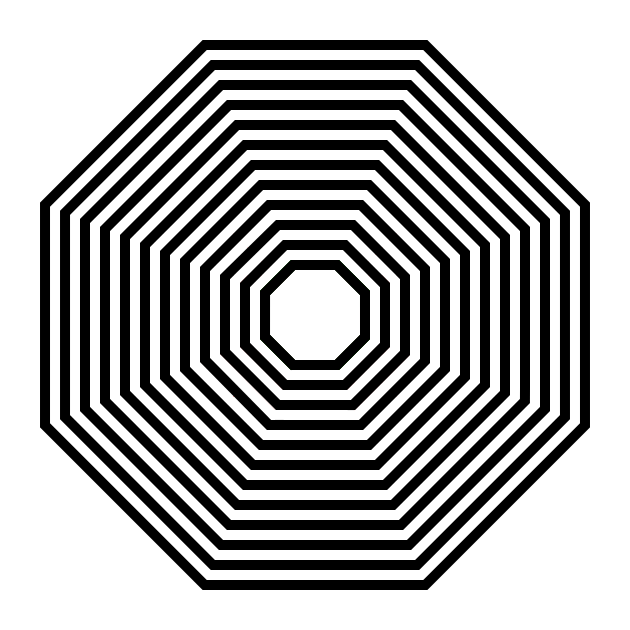
Step 1 - Draw 6 concentric octagons

6 concentric octagons

Step 2 - Add turnback sections

Once you select how many turn-backs you will have ( my above example has 4 ), draw them, which will typically need one additional line than the # you choose to account for the centered bottom pathway that leads to the goal. The exception is a 1 section labyrinth which needs only 1 turnback.

For a 4 section these will be drawn at 3, 6 , 9 and 12 o’clock. With the extra line occurring at 6 where you create a centered final pathway to the goal. Ensure the lines at 3 and 9 have the innermost pathway open, while 12 has the top pathway open.

Making an octagonal labyrinth step 2

Step 3 - Open pathways

At the location of the turn-backs you will need to create the appropriate pathways, along with the entrance and goal pathways. This will create the final labyrinth.

5 circuit octagonal labyrinth
 

PART 5 - HOW TO DRAW AN 11 CIRCUIT OCTAGONAL LABYRINTH - METHOD 1 & 2

Every thing you just learned can be applied to larger circuit labyrinths. Just add more circuits until you reach the desired number. I have shown a few steps of each method to draw an 11 circuit version (shown in the gallery). Use the next controls to see the steps. I did not complete the steps as it is basically, draw the next layer…again and again until you are complete.
 

PART 6 - DISCUSSION OF TURNBACKS AND LABYRINTH ORIENTATION
A note about turn-backs. My example above has 4 sections. But you can also draw the same labyrinth with more or less turn-backs (sections). Below I have a 1 section, 2 section, 4 section (the one we just made) and 8 section version. If you imagine walking these, the more sections, or turn-backs, the more back and forth walking you will do.

5 circuit octagonal labyrinths with 4 different sections

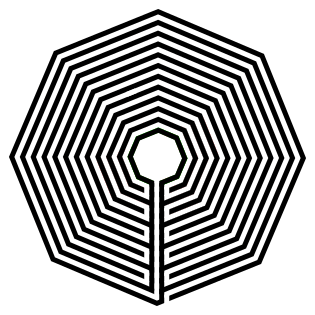
A note on labyrinth orientation. You also do not need to rotate the octagon you have made, and instead make the labyrinth entrance on a corner. Here is the 1 section version, which of course it could be done like the above in 2, 4, and 8 section versions. This is the 1 circuit with a corner entrance.
 

PART 7 - REAL WORLD OCTAGONAL LABYRINTH EXAMPLES
There are many octagonal labyrinths to choose form if you would like to visit them. Here are 4 in the US:

And the famous international versions:

A also wanted to give you some information on the most famous octagonal labyrinth in the world, the Amiens Labyrinth in the cathedral in Amiens, France. You can find some great pictures and information about the labyrinth from Atlas Obscura. It has been around since 1288 !

And it has a cousin, as far as labyrinths have cousins I guess, an octagonal labyrinth located in the parish church of the Basilica of Saint-Quentin, in St Quentin, France. It was made sometime around 1495 which makes it both very old, and yet 200 years younger then Amiens !

Additional posts you might like:

10 of the Most Frequently asked Questions about Labyrinths, with Answers

The 8 best books about mazes, labyrinths and their history

If you prefer making labyrinths, you can find step by step labyrinth making instructions for over 20 different versions.

How to Digitally Draw Hexagonal Labyrinths

In the past I have shown you how to make labyrinths that are classical, circular, square and octagonal. Today I add one more version of the labyrinth, the hexagonal labyrinth. I will start with how to draw a hexagon and then expand that out to a full digital hexagonal labyrinth. Here are the sections to guide you (with jumps if you want to go directly to a section).

PART 1 - HOW TO DRAW A HEXAGON

PART 2 - HOW TO DRAW A 5 CIRCUIT HEXAGONAL LABYRINTH

PART 3 - HOW TO DRAW AN 11 CIRCUIT HEXAGONAL LABYRINTH

PART 4 - DISCUSSION OF TURNBACKS AND ORIENTATIONS

PART 5 - REAL WORLD LABYRINTH EXAMPLES

PART 1 - HOW TO DRAW A HEXAGON

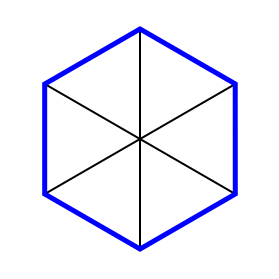
If you want to draw an hexagon with equal lengths here is the method I would use.

Step 1 Draw a straight line

Step 2 Rotate the line 60 degrees

Obviously this is a digital method where you can copy and paste then rotate, but it also works if you are hand drawing. Use a pencil and protractor and ensure you use the same length of line.

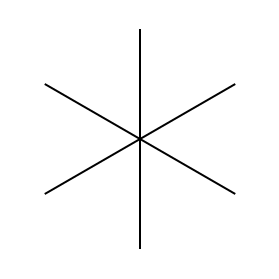
Step 3 Rotate the line 60 degrees again

This will create what looks like a widely spaced asterisk.

vertical line

Step 1 Draw a line

draw a hexagon step 2

Step 2 Rotate 60 degrees

draw a hexagon step 3

Step 3 Rotate 60 degrees again

Step 4 Connect the ends of the lines

This will create outer walls of the hexagon that are the same length.

draw a hexagon step 4

Connect the ends of the lines

Step 5 (both are optional) Delete the original lines and rotate the hexagon

You can delete the guidelines to create your final hexagon, but you may not want to. Why ? Because when you create a labyrinth using this template the guidelines you used also guide you on when you turn the lines (or alternatively embed the hexagon) for your next layer of the labyrinth. You also have the option to rotate the hexagon to have a wall parallel to the bottom of the page/screen, but I did not do this in my example.

blue line hexagon

Hexagon

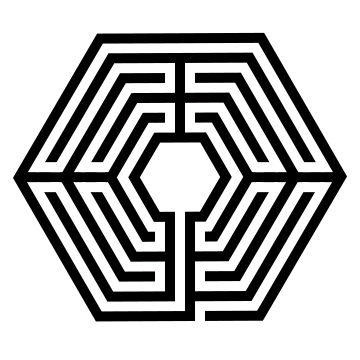
I wanted to draw a hexagonal labyrinth with the walls and pathways of equal width at an equal width apart (similar to a standard equal maze if you are familiar with that construction). I think it looks best visually. If you are not concerned with that aesthetic you should be able to eyeball your labyrinth together much easier. Here is a standard equal labyrinth that I made that has 4 sections (4 internal turn-back locations).

4 section hexagonal labyrinth

4 section hexagonal labyrinth

If you are eyeballing the drawing of this type of labyrinth, I suggest you start with the center goal portion and work your way out in layers. Could you design in the opposite direction, from the outside in ? Of course you can ! BUT, you may run out of room for your center goal ! If you go inside out, you only run out of room if you are using a piece of paper that is too small (and digitally you would never run out of room) !!

Also I want you to notice where the walls of the labyrinth make their turns. I have highlighted them below in blue - if you made your Hexagon using my method above and you did not delete the guidelines here you can see that each turn happens at these guides.

4 section hexagonal labyrinth with sections shown for reference


PART 2 - HOW TO DRAW A 5 CIRCUIT HEXAGONAL LABYRINTH

Note that this method is for digital creation and involves drawing and cutting (erasing).

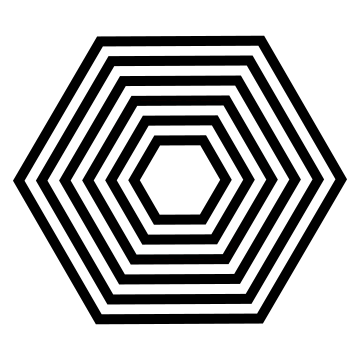
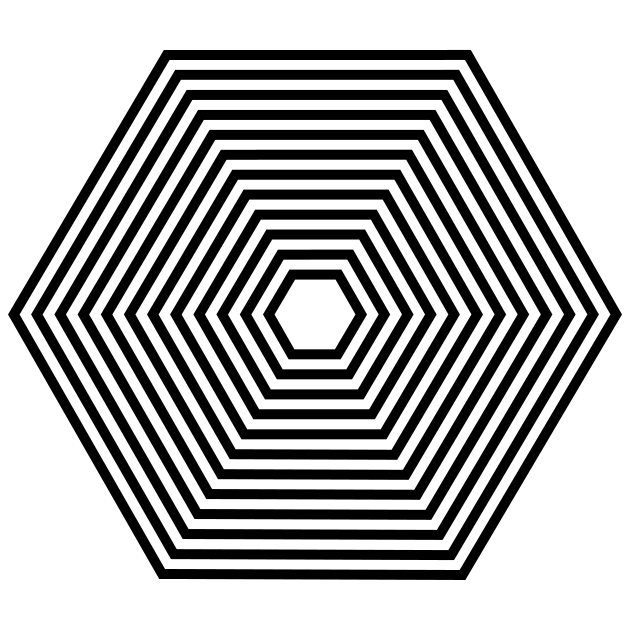
Step 1 Draw 6 concentric hexagons

Now that you know how to draw a good hexagon let’s get started drawing our labyrinth by drawing 6 of them ! I always use a standard equal construction, meaning that the width of the walls equals the width of the pathways in between them. For this version I have rotated the hexagon so that bottom is parallel to the bottom of the page.

PROTIP: Start your drawing with the center goal so you do not run out of room !

6 concentric hexagons

Step 1 - Draw 6 concentric hexagons

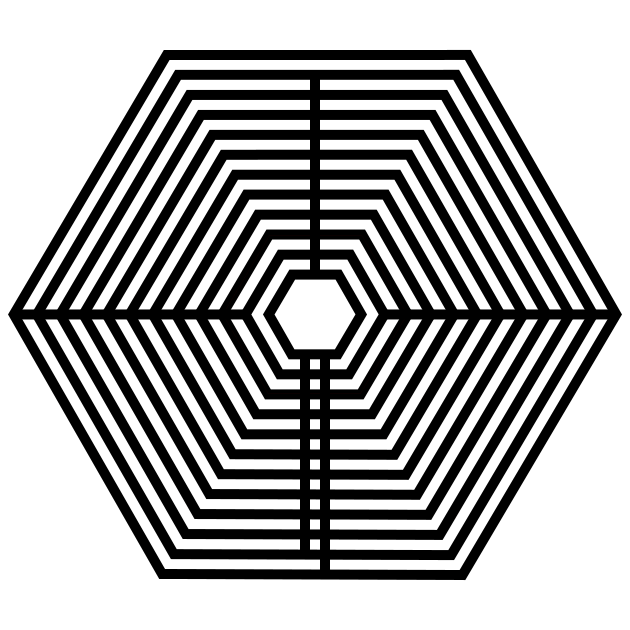
Step 2 Draw the internal sections

In this step we draw our internal turnaround points which create sections for the labyrinth. In our example we have 4 sections. At 9, 12, and 3 o’clock draw straight lines that cut off all but 1 pathway. At 12 this is the outside path and at 3, and 9 it is the most internal pathway. Finally create what will become the final pathway to the goal by adding 2 walls centered at 6 o’ clock. The left wall of those 2 walls should not cover the outside pathway.
draw a hexagon step 2

Step 3 Break the walls into pathways

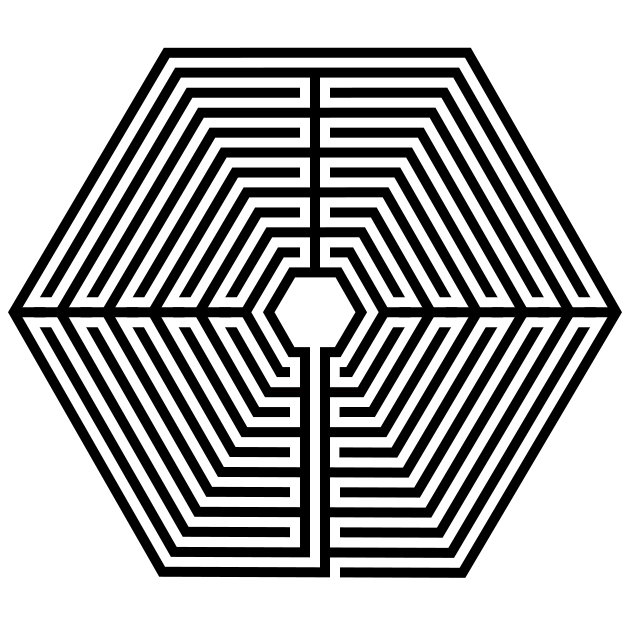
Each section will need 4 ‘cuts’ to make the pathways wind thru the section. Also cut the final walkway to the goal and the entrance just to the right of that.

5 circuit Hexagon labyrinth

A note about size. You can add additional steps if you would like, just continually adding internal sections until you are ready to finish the labyrinth by adding a final edge with an entrance.


PART 3 - HOW TO DRAW AN 11 CIRCUIT HEXAGONAL LABYRINTH

I have combined this into an abbreviated how -to with a gallery and relevant notes. You van build the labyrinth in the small gallery by using the next controls.

Step 1 Draw 12 concentric hexagons

Now that you know how to draw a good hexagon let’s get started drawing our labyrinth by drawing 12 of them. I always use a standard equal construction, meaning that the width of the walls equals the width of the pathways in between them. For this version I have rotated the hexagon so that bottom is parallel to the bottom of the page.

PROTIP: To create a hexagon of x# of different circuits, you just need to draw x+1# of hexagons. So a 23 circuit labyrinth needs 24 hexagons, etc.

PROTIP: Start your drawing with the center goal so you do not run out of room !

Step 2 Draw the internal sections - as above for 5 circuits

Step 3 Break the walls into pathways - as above for 5 circuits

PART 4 - DISCUSSION OF TURNBACKS AND ORIENTATIONS

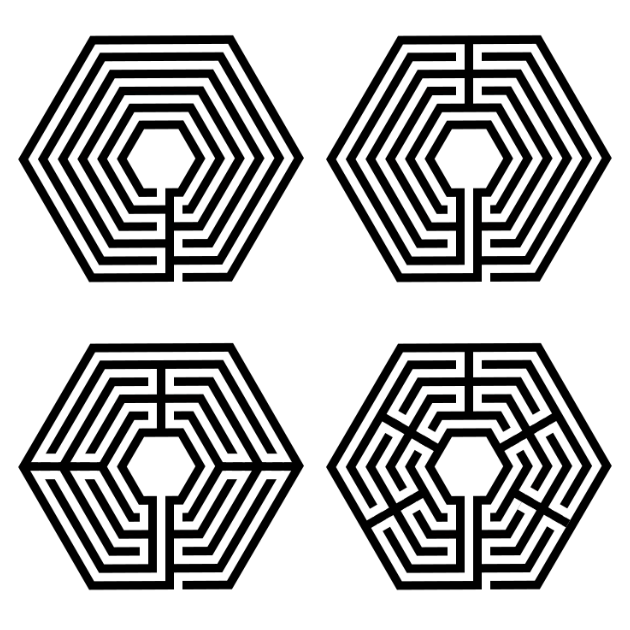
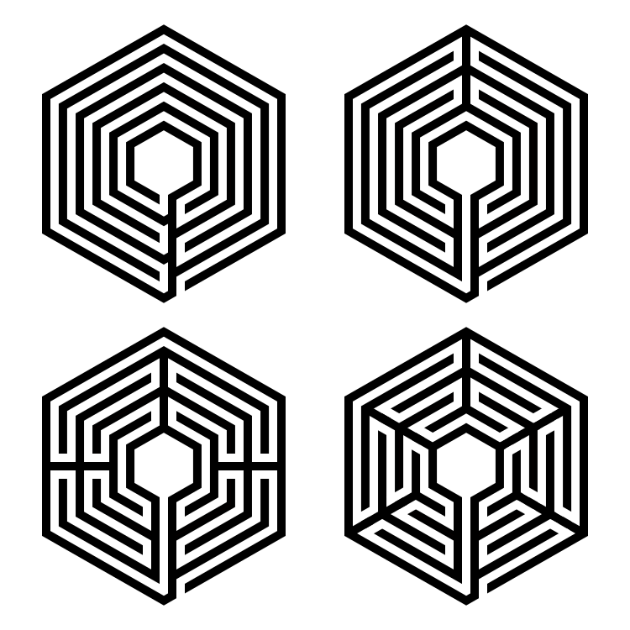
A note about turn-backs. My example above has 4 sections. But you can also draw the same labyrinth with more or less turn-backs (sections). Below I have a 1 section, 2 section, 4 section (the one we just made) and a 6 section version of hexagonal labyrinths. If you imagine walking these, the more sections, or turn-backs, the more back and forth walking you will do.

comparison of 4 different 5 circuit hexagonal labyrinths

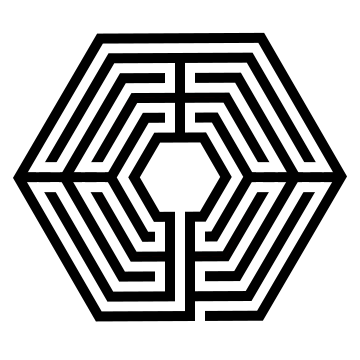
A note about labyrinth orientation. I also wanted to show you how the labyrinth would look if we had not rotated it to start. In this version the entrance and final pathway to the goal lead from a corner instead of center on a flat portion of the outer edge. This is all about your personal preference. Here are how the 4 sectioned labyrinths look:

4 different hexagonal labyrinths with corner starts

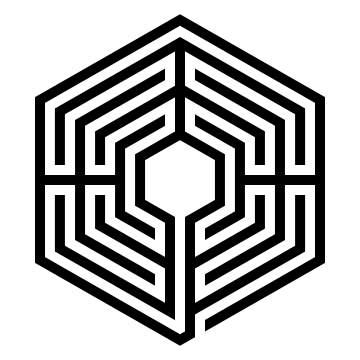
And let’s compare the standard 4 section versions in more detail because we can adjust our steps above to make another version. Step 1 is the same except for the orientation of the hexagons you draw. Step 2 is actually the same as far as where the lines are drawn and what pathways are left open. And Step 3 is also the same since you cut the pathways in the same place ! So essentially the steps are pretty much the same !

Hexagon labyrinth with flat start
Hexagon labyrinth with corner start
 

PART 5 - REAL WORLD LABYRINTH EXAMPLES

We just learned how to draw hexagonal labyrinths, but if you want to see some in the real world, I have pulled a few together you could actually walk !

Additional posts you might like (maze artwork):

Guardian Bridge Maze

QRO Walking Street Maze

Giraffe Maze

A Collection of Sign Mazes

Rock n Roll Hall of Fame Maze

How to Make a 7 Circuit Caerdroia Labyrinth

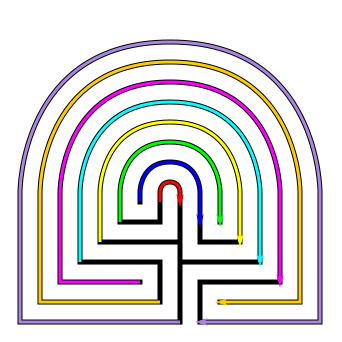
In this post I will show you how to draw a 7 circuit Caerdroia labyrinth. I first became aware of this type of labyrinth, a variation of the Cretan labyrinth, when I saw it in the film, The Night House, which has a maze theme weaved into the storyline. This type of labyrinth is Welsh and they were used for gatherings of singing and dancing. To learn more about them check out Wikipedia.

How to Draw a 7 Circuit Caerdroia Labyrinth

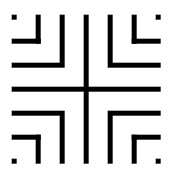
Step 1 Draw the seed pattern

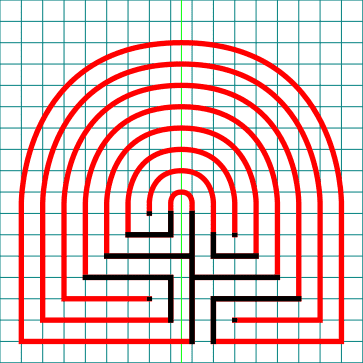
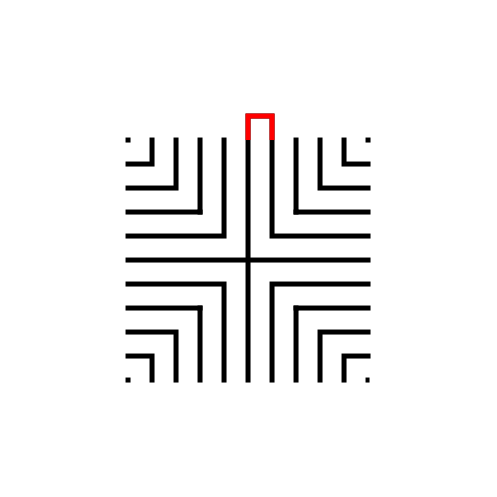
I came up with 2 possible seed patterns for this. The first is based on the classical 7 seed labyrinth and adjusted for the unique shape of this labyrinth. You can see this below in black overlaid onto the complete labyrinth in red. It uses a center cross (in this case offset), 4 L’s and 4 dots just like that seed uses.

The step by step instructions will use this seed, however there is another seed option I will review below.

Caerdroia Labyrinth seed pattern

Step 1 - Draw the seed pattern

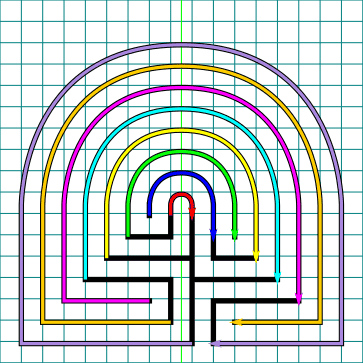
I think of all of them labyrinths I have drawn this one is best made using a grid to guide your drawing. Here is the seed pattern shown against a blue grid. I also added a single green line that is only used for the arches across the top of the labyrinth.

Caerdroia Labyrinth with grids seed pattern

Step 2 Note the Connection points

All seeds become labyrinths by connecting one point to another around the entire shape. For a 7 circuit you will need to make 8 connections as labeled below.

Caerdroia Labyrinth seed pattern with links shown

Step 2 Note the connections

Step 3 Note the location of the peaks and shape changes

In the northern part of the labyrinth, you have all circular pathways, and all of them have a peak that is centered between the first connection points (also centered above the center goal).

In the southern part of the labyrinth you have a square labyrinth. This portion of the labyrinth fills bottom half and a half step above the seed (this is an aesthetic choice by me - you may also use the seed as the point of shape change if you prefer)

Caerdroia Labyrinth design analysis

Step 3 Location and shape changes

Step 4 Draw and connect the pathways to create the labyrinth

After all the explanation above, connect the same numbered pathways to create the labyrinth. Connections 1-5 require (mostly) the drawing of semi-circles, while 6-8 require pathway extensions before drawing the semicircles.

Connect the pathways in order from left to right. Here are the connections drawn using different colored arrows:

Caerdroia Labyrinth connections drawn

Here is the labyrinth being made with the grids shown which may help. Again the green line is only used for the peak of the top side arches.

Caerdroia labyrinth pathways with grids shown

That completes the labyrinth, BUT let’s look at the other seed I mentioned above.

ALTERNATIVE Step 1 Draw the seed pattern

To simplify the connection drawing this seed requires only the drawing of semicircles, but a much larger seed which looks more like a very wide tree. There are still 8 connections to make, but they are more uniform. Just make sure you align all of their transition points from square shaped to circular shaped.

Caerdroia Labyrinth alternative seed pattern

All other step are basically the same, with just the drawing of your walls changing since you did more upfront work ! Either method ends with this final drawn version of the 7 circuit Caerdroia labyrinth.

Caerdroia Labyrinth

(OPTIONAL) STEP 5 Make any Aesthetic Changes

You can make many aesthetic choices for this labyrinth.

You have options for the wall to pathway ratio. Below I made them equal with gives the labyrinth a bolder look. The display of corners is also a choice (I chose soft curved edges below vs. sharp corners above). And finally, how the ends of lines will look (I chose rounded vs squared). Personally, I prefer this bolder look. You can also add some color if you prefer.

Caerdroia Labyrinth with thick walls

That concludes our instructions. Good luck in making your own design !

One thing that is difficult to find is a real world example of this type of labyrinth in the US. However if you are ever in Wales check out the Caerdroia, Gwydir Forest which contains a labyrinth built into the woods. You can plan your trip and get more information at the link above.

Additional posts you might like:

Maze Construction - 5 Maze Design Decisions Make All the Difference

US Labyrinths to visit by state

10 of the Most Frequently asked Questions about Labyrinths, with Answers

How to Draw a Large 19 Circuit Square Labyrinth

Previously I’ve shown you how to draw an 11 circuit square labyrinth, a 7 circuit square labyrinth and a 3 circuit square labyrinth. Today we review making any large square labyrinth with the only limit to size the one you choose. Below is a 19 circuit square labyrinth, but you can make one larger if you choose. Here are the sections of the post after this introduction:

PART 1: STEP BY STEP LABYRINTH DRAWING INSTRUCTIONS

PART 2: ADDITIONAL SIZES DISCUSSION

PART 1: STEP BY STEP LABYRINTH DRAWING INSTRUCTIONS

Step 1: The starting seed pattern

The starting seed pattern to the right is based on an imaginary 6x6 box grid. This seed can become an 11 circuit labyrinth by following the typical construction steps (and it could be both a classic or a square labyrinth). The simple way to make a larger version is to extend the lines additional blocks in all directions to create a larger seed. See below (with 2 new levels making it a 10x10 grid):

11 circuit labyrinth seed pattern -how to draw an 11 circuit labyrinth part 1
19 circuit labyrinth seed pattern

Large seed pattern

Step 2: Connect the firstline to create the goal

Draw a boxed line from the top of the plus sign to the L directly to the right using that extends 1 grid high. This line will form what will become the goal of the labyrinth.

How to Draw an 11 Circuit Labyrinth, step 2

Step 3: Connect the next endpoint to the left to the next endpoint on the right

Every step from now on will be basically the same. Move one point to your left (moving counterclockwise) and connect that to the next point on the right (moving clockwise). In this case the large backwards L on the top left of the seed pattern to the small L on the top right of the seed.

How to Draw an 11 Circuit Labyrinth - Part 3

Steps 4-21: Connect the next endpoint to the left to the next endpoint on the right

I assume you have the pattern down to complete with only pictures with nice red lines. Follow the graphics to complete steps 4-20. Here is the Summary of the connections you will make starting from the seed:

11 Circuit labyrinth
how to make a 19 Circuit Square labyrinth steps 6-21

Steps 6 - 21

That completes the drawing of a massive 19 Circuit Square Labyrinth. And now you can go even bigger !

19 Circuit Square Labyrinth

19 Circuit Square Labyrinth

PART 2: ADDITIONAL SIZES DISCUSSION

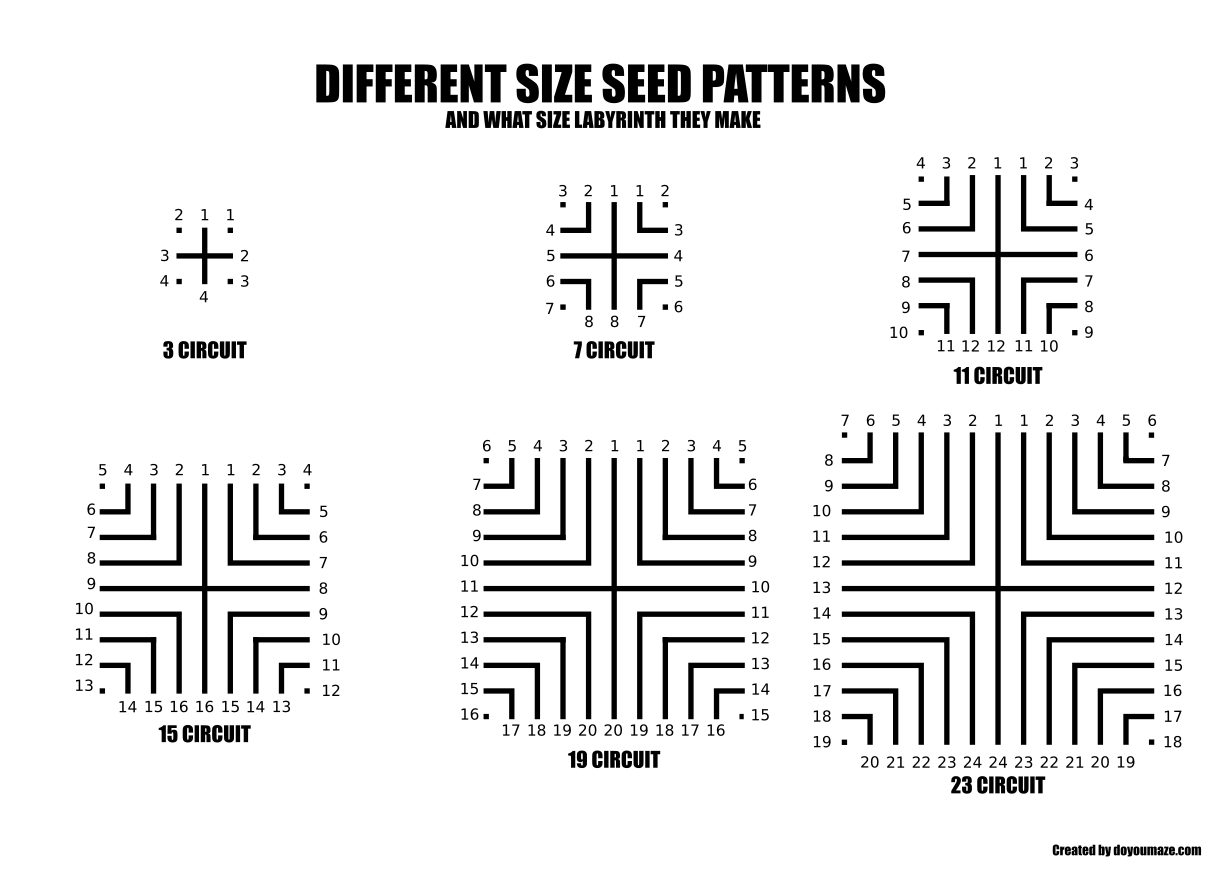
Making a square labyrinth once you know the seed pattern and how to connect the ends is relatively easy. Here are the first 6 seed patterns and what size labyrinth they make. Each time you add a new layer to the seed you are adding 4 circuits. This is because a layer includes a back and forth on both sides of the structure.

Labyrinth Seed connection comparisons.

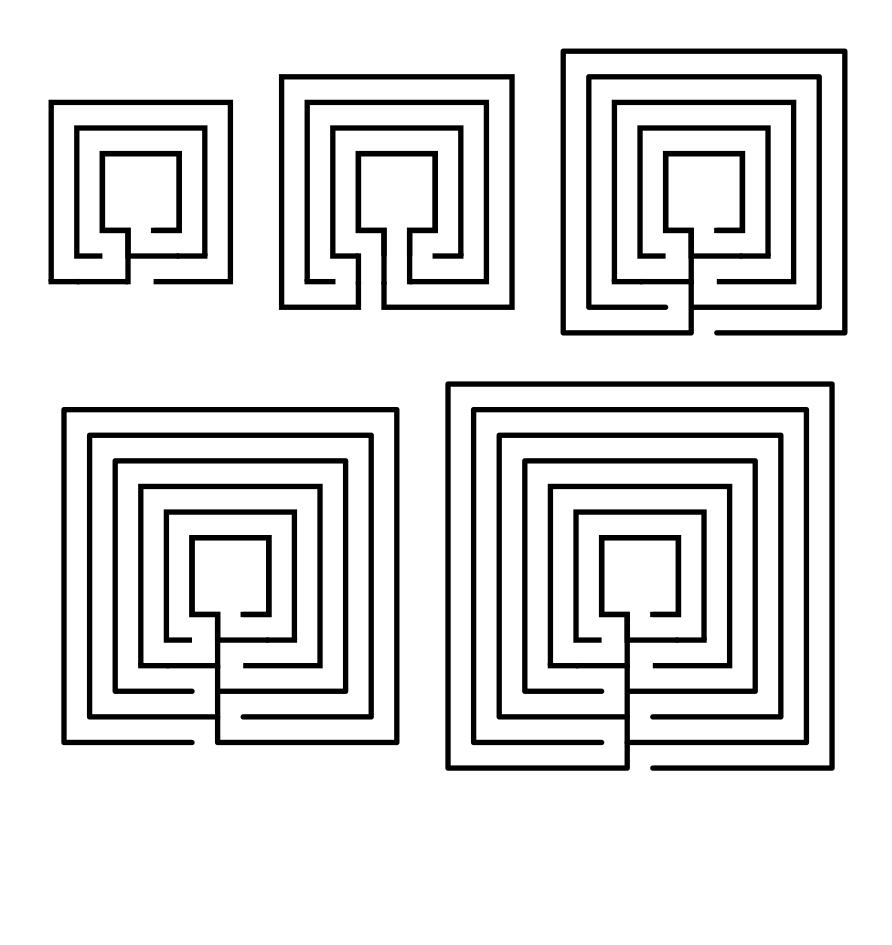
If you prefer more flexibility with the number of circuits, I suggest you use the large center alternative which allows you to make any number of circuits. Here is the same center, but made into 2, 3, 4, 5, and 6 circuit labyrinth versions:

Square labyrinth 2-6 circuits

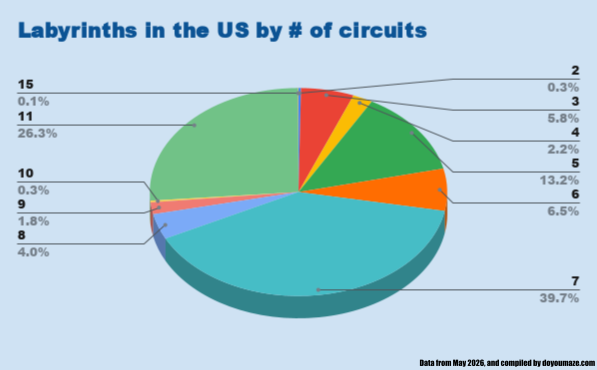
Normally this is where I add real world examples of labyrinths so you can see what you just learned done in practice in the real world. However, in my research, of the over 4K labyrinths in the US, the largest in terms of circuits is 15, and there are only 3 of them. Really any circuits over 11 are rare to find in the real world, but you can still draw them ! Here is a chart showing my research:

Labyrinths in the US by # of circuits
 

Additional blog posts you might enjoy:

10 of the Most Frequently asked Questions about Labyrinths, with Answers

The 8 best books about mazes, labyrinths and their history

If you prefer making labyrinths, you can find step by step labyrinth making instructions for over 20 different versions.